# 3.2.4. Aplicaciones para generar la participación activa y la interacción.

<span style="font-size: 11pt; font-family: Roboto,sans-serif; color: #000000; background-color: transparent; font-weight: 400; font-style: normal; font-variant: normal; text-decoration: none; vertical-align: baseline; white-space: pre-wrap;">Otras situaciones que se pueden dar en clase son las que requieren participación del alumnado pudiendo, incluso, valorar la comprensión inmediata de un contenido presentado y sugerir materiales interactivos para realizar un refuerzo.</span>

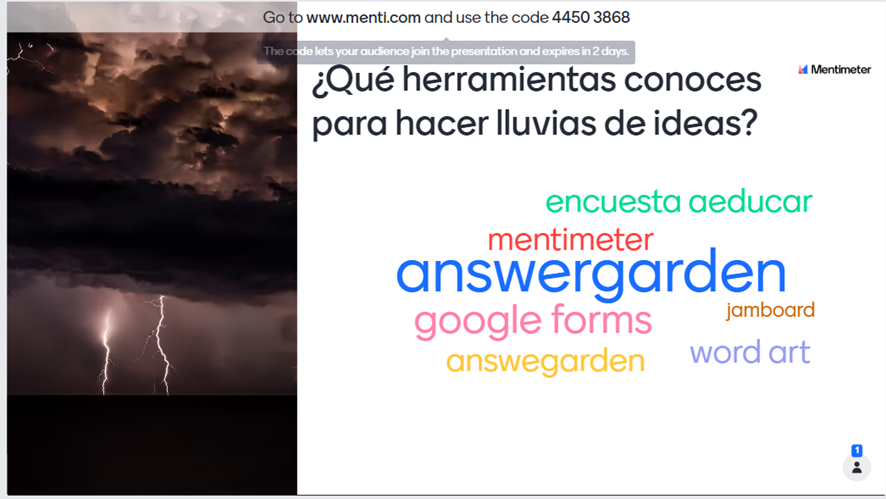
<span style="font-size: 11pt; font-family: Roboto,sans-serif; color: #000000; background-color: transparent; font-weight: 400; font-style: normal; font-variant: normal; text-decoration: none; vertical-align: baseline; white-space: pre-wrap;">Como es habitual hay multitud de herramientas, hemos seleccionado</span>[<span style="font-size: 11pt; font-family: Roboto,sans-serif; color: #000000; background-color: transparent; font-weight: 400; font-style: normal; font-variant: normal; text-decoration: none; vertical-align: baseline; white-space: pre-wrap;"> </span><span style="font-size: 11pt; font-family: Roboto,sans-serif; color: #1155cc; background-color: transparent; font-weight: 400; font-style: normal; font-variant: normal; text-decoration: underline; -webkit-text-decoration-skip: none; text-decoration-skip-ink: none; vertical-align: baseline; white-space: pre-wrap;">Mentimeter</span>](https://www.mentimeter.com/es-ES)<span style="font-size: 11pt; font-family: Roboto,sans-serif; color: #000000; background-color: transparent; font-weight: 400; font-style: normal; font-variant: normal; text-decoration: none; vertical-align: baseline; white-space: pre-wrap;"> ya que, por un lado, permite realizar presentaciones, pero también realizar una lluvia de ideas, recopilar conceptos fundamentales o reflexionar en grupo. Para ponerlo en práctica de manera sencilla, podemos crear una nube de palabras con una pregunta clave que favorecerá una lluvia de ideas. Nos proporcionará un código que deberán introducir los participantes en la dirección</span>[<span style="font-size: 11pt; font-family: Roboto,sans-serif; color: #000000; background-color: transparent; font-weight: 400; font-style: normal; font-variant: normal; text-decoration: none; vertical-align: baseline; white-space: pre-wrap;"> </span><span style="font-size: 11pt; font-family: Roboto,sans-serif; color: #1155cc; background-color: transparent; font-weight: 400; font-style: normal; font-variant: normal; text-decoration: underline; -webkit-text-decoration-skip: none; text-decoration-skip-ink: none; vertical-align: baseline; white-space: pre-wrap;">www.menti.com</span>](http://www.menti.com)<span style="font-size: 11pt; font-family: Roboto,sans-serif; color: #000000; background-color: transparent; font-weight: 400; font-style: normal; font-variant: normal; text-decoration: none; vertical-align: baseline; white-space: pre-wrap;"> y donde les permitirá responder a la pregunta. Las respuestas que más se repitan irán obteniendo un tamaño mayor.</span>

<span style="font-size: 11pt; font-family: Roboto,sans-serif; color: #000000; background-color: transparent; font-weight: 400; font-style: normal; font-variant: normal; text-decoration: none; vertical-align: baseline; white-space: pre-wrap;"><span style="border: none; display: inline-block; overflow: hidden; width: 602px; height: 339px;">![image-1671449088796.png](https://lh3.googleusercontent.com/PsyMRk1L2ihWRivv0PVltmG7YtsEtqDdQALdoCt0kZ-E4J6rol-sKZaBoPMHB_kgku0CrPsyWtOABW_mDamnC0KAOvfD6x_x6aE3bHe4Msbj65fz93fVGtU6f_wYwjClUWs9Z-FcXCB6fkK7n_sB3mQ)</span></span>

<span style="font-size: 11pt; font-family: Roboto,sans-serif; color: #000000; background-color: transparent; font-weight: 400; font-style: italic; font-variant: normal; text-decoration: none; vertical-align: baseline; white-space: pre-wrap;">Muestra de una nube de palabras en Mentimeter. Imagen tomada a través de captura en ordenador personal para este curso.</span>

<span style="font-size: 11pt; font-family: Roboto,sans-serif; color: #000000; background-color: transparent; font-weight: 400; font-style: normal; font-variant: normal; text-decoration: none; vertical-align: baseline; white-space: pre-wrap;">Algunos de los entornos de aprendizaje que estamos repasando durante el módulo también pueden ofrecer la participación del alumnado a través de encuestas, por ejemplo.</span>

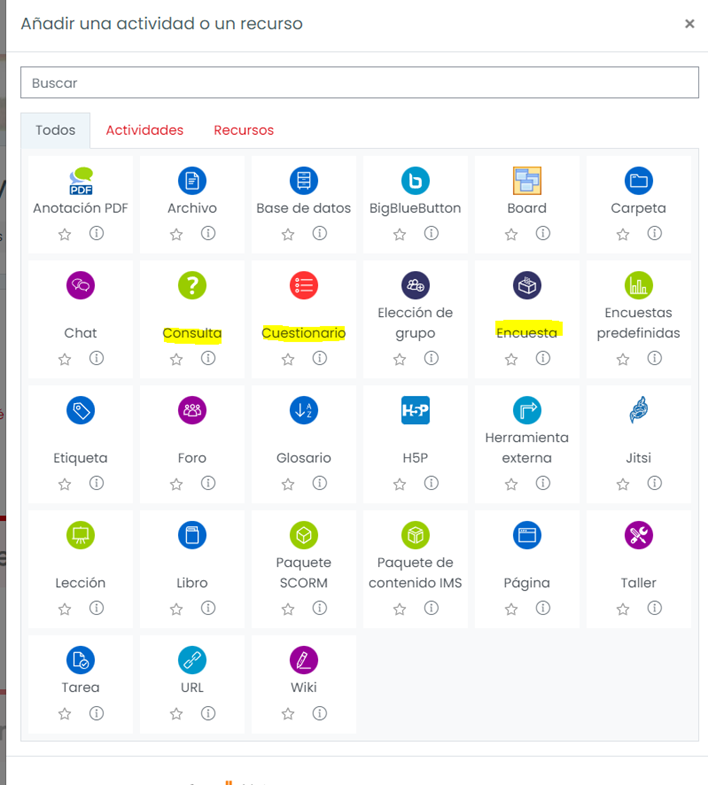
<span style="font-size: 11pt; font-family: Roboto,sans-serif; color: #000000; background-color: transparent; font-weight: 400; font-style: normal; font-variant: normal; text-decoration: none; vertical-align: baseline; white-space: pre-wrap;">Con Aeducar tenemos varios recursos que también nos permitirán recoger dicha información como son las encuestas, las consultas o los cuestionarios.</span>

<span style="font-size: 11pt; font-family: Roboto,sans-serif; color: #000000; background-color: transparent; font-weight: 400; font-style: normal; font-variant: normal; text-decoration: none; vertical-align: baseline; white-space: pre-wrap;"><span style="border: none; display: inline-block; overflow: hidden; width: 602px; height: 667px;">![image-1671449094478.png](https://lh5.googleusercontent.com/jJZbGRTcemsOPmq9u2Sxx-SKgZBiIBXzGUPr7TKJoLR-G6SeQ7Bj12a3QRnROXrMdOVOuN7Mr1dhZbBvXZnJQLoJxHDceyIyczJUGUqoBC5ACuSlnPIuDU1lhwmXg8rOwTV2OoRkOhiV9cBxX6w0SMU)</span></span>

<span style="font-size: 11pt; font-family: Roboto,sans-serif; color: #000000; background-color: transparent; font-weight: 400; font-style: italic; font-variant: normal; text-decoration: none; vertical-align: baseline; white-space: pre-wrap;">Elementos de Aeducar para encuestar. Imagen tomada a través de captura en ordenador personal para este curso.</span>

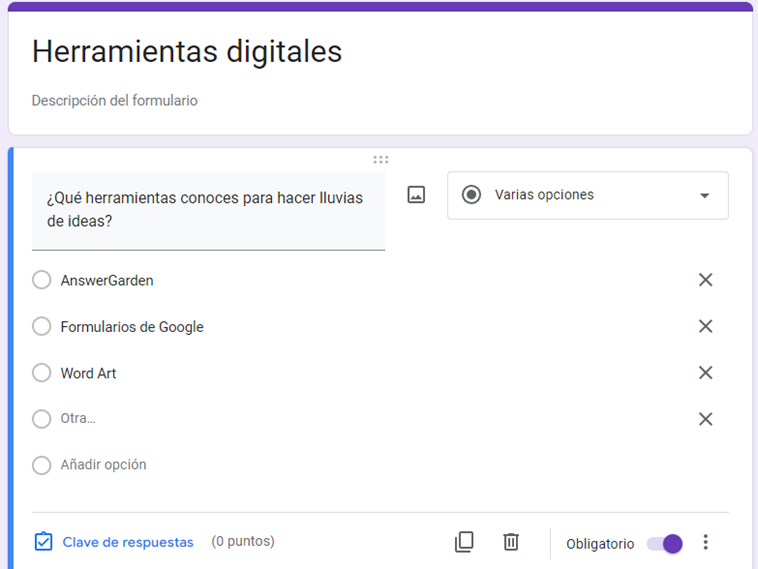
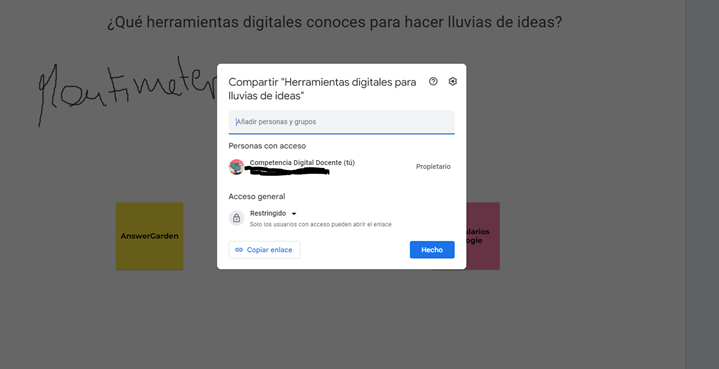
<span style="font-size: 11pt; font-family: Roboto,sans-serif; color: #000000; background-color: transparent; font-weight: 400; font-style: normal; font-variant: normal; text-decoration: none; vertical-align: baseline; white-space: pre-wrap;">En Google Classroom podemos usar los Formularios de Google para sugerir respuestas y ver cuáles han sido las más apoyadas, o también compartir una pizarra de Jamboard para que todos los participantes puedan escribir en ella y aportar así sus pensamientos.</span>

<span style="font-size: 11pt; font-family: Roboto,sans-serif; color: #000000; background-color: transparent; font-weight: 400; font-style: normal; font-variant: normal; text-decoration: none; vertical-align: baseline; white-space: pre-wrap;"><span style="border: none; display: inline-block; overflow: hidden; width: 375px; height: 281px;">![image-1671449107034.png](https://lh4.googleusercontent.com/HkScpDXiDmQ8lIJf9-zVMm0MRckPvMO6KrQzGd2HI6dXa6nB8wplNfoRGL0ZJAzNj4SryNCyfQ9l-Alnkmj_HbO6U3fUBgoqnuMrqeOy01X8MhPqxYPba4OI8LS43WX27mqNk_CqBtv_A3_08MowJyk)</span></span>[<span style="font-size: 11pt; font-family: Roboto,sans-serif; color: #1155cc; background-color: transparent; font-weight: 400; font-style: normal; font-variant: normal; text-decoration: underline; -webkit-text-decoration-skip: none; text-decoration-skip-ink: none; vertical-align: baseline; white-space: pre-wrap;"><span style="border: none; display: inline-block; overflow: hidden; width: 497px; height: 255px;">![image-1671449121990.png](https://lh6.googleusercontent.com/BRaxlo-rOwIP-klE-Odcs0NLTEVsriDudrIppu6D0bH6EB9J2wD7oREfzVdylNfm0GyZ0BFMJJpUPSAgd0qxGMmf48oDf7r4uoePb3chieHiigGR71L2-G96Gal6obGTn1oUzoprHdoHaBHQPULfgzk)</span></span>](https://libros.catedu.es/uploads/images/gallery/2022-12/image-1671449107034.png)<span style="font-size: 11pt; font-family: Roboto,sans-serif; color: #000000; background-color: transparent; font-weight: 400; font-style: normal; font-variant: normal; text-decoration: none; vertical-align: baseline; white-space: pre-wrap;"> </span>

<span id="bkmrk--2" style="font-weight: normal;"></span>

<span style="font-size: 11pt; font-family: Roboto,sans-serif; color: #000000; background-color: transparent; font-weight: 400; font-style: italic; font-variant: normal; text-decoration: none; vertical-align: baseline; white-space: pre-wrap;">Uso de Google Forms y Jamboard para hacer encuestas. Imágenes tomadas a través de captura en ordenador personal para este curso.</span>