# 3.1. Herramienta de autor: Genially

![genially](https://www.cyldigital.es/sites/default/files/selflearning/scorm/cdb9566c/genially_logo.jpg)

**Genially**  también conocida como [**genial.ly** ](http://www.genial.ly)es una **herramienta de diseño gráfico de edición y creación de contenidos visuales e interactivos en línea para la comunicación.** Ellxs mismxs se definen como *la herramienta más versátil para crear todo tipo de contenidos alucinantes.* **Genially ofrece al usuario un sistema online para hacer presentaciones**, dossieres e informes, gráficos interactivos, infografías, gamificaciones como juegos de preguntas y respuestas (quizes), escape room, resolver pistas..., también mapas de ideas y diagramas, vídeos, guías o materiales formativos de diversos tipos: documentos, pósteres, carteles, gráficos, horarios... Es sencillo hacer también publicaciones para RRSS con formatos ya prediseñados de *post* o publicaciones para web y móviles, personal branding (CV, portfolio...), tarjetas interactivas.... ¡incluso propuestas comerciales! **Pero siempre con registro o *log in* previo.**

> **Genially** es una startup española conocida por su **plataforma para crear contenido interactivo como presentaciones.** Compite contra grandes servicios como Canva y Prezi, aunque se define como complementaria y apuesta con llegar a integraciones con tecnológicas como Google o Microsoft. [Roberto Corrales](https://www.businessinsider.es/redaccion/roberto-corrales) en [*España versus 'big tech': Genially, la startup que compite contra los gigantes de EEUU integrándose con Google y Microsoft.*](https://www.businessinsider.es/puede-interesar-espanola-genially-tecnologicas-eeuu-1114951)

<details id="bkmrk-conoce-a-juan-rubio%2C"><summary>Conoce a Juan Rubio, cofundador y CEO de Genially y al equipo de Genially en Córdoba.</summary>

["Creamos ](https://libros.catedu.es/uploads/images/gallery/2023-02/bdYimachen.png)[Genially](https://genial.ly/es/)[ con la misión de hacer de la comunicación visual interactiva un nuevo estándar para la comunicación. Nos dimos cuenta de que **crear este tipo de contenidos era caro y en ocasiones, lento si no tenías conocimientos de programación o de diseño**", comenta Juan Rubio, CEO y cofundador de Genially, a *Business Insider España*.![imachen.png](https://libros.catedu.es/uploads/images/gallery/2023-02/scaled-1680-/bdYimachen.png)](https://libros.catedu.es/uploads/images/gallery/2023-02/bdYimachen.png)

Puedes mover el cursor en esta infografía interactiva que el equipo de Genially ha creado para darse a conocer:

<div style="width: 100%;"><div style="position: relative; padding-bottom: 56.158357771260995%; padding-top: 0; height: 0;"><iframe allowfullscreen="allowfullscreen" frameborder="0" height="3064px" scrolling="yes" src="https://view.genial.ly/5b8928f2ded5511f2111744f" style="position: absolute; top: 0; left: 0; width: 100%; height: 100%;" title="Genially Team" width="5456px"></iframe>

</div></div><span style="border-block: unset; border-inline: unset; border-start-start-radius: unset; border-start-end-radius: unset; border-end-start-radius: unset; border-end-end-radius: unset; overflow-inline: unset; overflow-block: unset; overscroll-behavior-inline: unset; overscroll-behavior-block: unset; margin-block: unset; margin-inline: unset; scroll-margin-block: unset; scroll-margin-inline: unset; padding-block: unset; padding-inline: unset; scroll-padding-block: unset; scroll-padding-inline: unset; inset-block: unset; inset-inline: unset; block-size: unset; min-block-size: unset; max-block-size: unset; inline-size: unset; min-inline-size: unset; max-inline-size: unset; contain-intrinsic-block-size: unset; contain-intrinsic-inline-size: unset; background: unset; background-blend-mode: unset; border: unset; border-radius: unset; box-decoration-break: unset; -moz-float-edge: unset; display: unset; position: fixed; float: unset; clear: unset; vertical-align: unset; overflow: unset; overflow-anchor: unset; transform: unset; rotate: unset; scale: unset; translate: unset; offset: unset; scroll-behavior: unset; scroll-snap-align: unset; scroll-snap-type: unset; scroll-snap-stop: unset; overscroll-behavior: unset; isolation: unset; break-after: unset; break-before: unset; break-inside: unset; resize: unset; perspective: unset; perspective-origin: unset; backface-visibility: unset; transform-box: unset; transform-style: unset; transform-origin: unset; contain: unset; container: unset; appearance: unset; -moz-orient: unset; will-change: unset; shape-image-threshold: unset; shape-margin: unset; shape-outside: unset; touch-action: unset; -webkit-line-clamp: unset; scrollbar-gutter: unset; columns: unset; column-fill: unset; column-rule: unset; column-span: unset; content: unset; counter-increment: unset; counter-reset: unset; counter-set: unset; opacity: unset; box-shadow: unset; clip: rect(0px, 0px, 0px, 0px); filter: unset; backdrop-filter: unset; mix-blend-mode: unset; font: unset; font-synthesis: unset; font-palette: unset; visibility: unset; writing-mode: unset; text-orientation: unset; print-color-adjust: unset; image-rendering: unset; image-orientation: unset; dominant-baseline: unset; text-anchor: unset; color-interpolation: unset; color-interpolation-filters: unset; fill: unset; fill-opacity: unset; fill-rule: unset; shape-rendering: unset; stroke: unset; stroke-width: unset; stroke-linecap: unset; stroke-linejoin: unset; stroke-miterlimit: unset; stroke-opacity: unset; stroke-dasharray: unset; stroke-dashoffset: unset; clip-rule: unset; marker: unset; paint-order: unset; border-collapse: unset; empty-cells: unset; caption-side: unset; border-spacing: unset; color: unset; text-transform: unset; hyphens: unset; -moz-text-size-adjust: unset; text-indent: unset; overflow-wrap: unset; word-break: unset; text-justify: unset; text-align-last: unset; text-align: unset; letter-spacing: unset; word-spacing: unset; white-space: pre; text-shadow: unset; text-emphasis: unset; text-emphasis-position: unset; tab-size: unset; line-break: unset; -webkit-text-fill-color: unset; -webkit-text-stroke: unset; ruby-align: unset; ruby-position: unset; text-combine-upright: unset; text-rendering: unset; text-underline-offset: unset; text-underline-position: unset; text-decoration-skip-ink: unset; hyphenate-character: unset; cursor: unset; pointer-events: unset; -moz-user-input: unset; -moz-user-modify: unset; -moz-user-focus: unset; caret-color: unset; accent-color: unset; color-scheme: unset; scrollbar-color: unset; list-style: unset; quotes: unset; -moz-image-region: unset; margin: unset; overflow-clip-margin: unset; scroll-margin: unset; outline: unset; outline-offset: unset; page: unset; padding: unset; scroll-padding: unset; top: 0px; right: unset; bottom: unset; left: unset; z-index: unset; flex-flow: unset; place-content: unset; place-items: unset; flex: unset; place-self: unset; order: unset; width: unset; min-width: unset; max-width: unset; height: unset; min-height: unset; max-height: unset; box-sizing: unset; object-fit: unset; object-position: unset; grid-area: unset; grid: unset; gap: unset; aspect-ratio: unset; contain-intrinsic-size: unset; vector-effect: unset; stop-color: unset; stop-opacity: unset; flood-color: unset; flood-opacity: unset; lighting-color: unset; mask-type: unset; clip-path: unset; mask: unset; x: unset; y: unset; cx: unset; cy: unset; rx: unset; ry: unset; r: unset; d: unset; table-layout: unset; text-overflow: unset; text-decoration: unset; ime-mode: unset; scrollbar-width: unset; user-select: text; -moz-window-dragging: unset; -moz-force-broken-image-icon: unset; transition: unset; animation: unset; -moz-box-align: unset; -moz-box-direction: unset; -moz-box-flex: unset; -moz-box-orient: unset; -moz-box-pack: unset; -moz-box-ordinal-group: unset;">&lt;div style="width: 100%;"&gt;&lt;div style="position: relative; padding-bottom: 56.158357771260995%; padding-top: 0; height: 0;"&gt;&lt;iframe title="Genially Team" frameborder="0" width="5456px" height="3064px" style="position: absolute; top: 0; left: 0; width: 100%; height: 100%;" src="https://view.genial.ly/5b8928f2ded5511f2111744f" type="text/html" allowscriptaccess="always" allowfullscreen="true" scrolling="yes" allownetworking="all"&gt;&lt;/iframe&gt; &lt;/div&gt; &lt;/div&gt;</span>

</details>Lo más destacable es la facilidad de su interfaz: **genera contenidos digitales interactivos sin necesidad de programar** (lo que se conoce como *no code)* y sin tener grandes conocimientos de diseño. Es una herramienta utilizada a menudo por empresas, creadores de contenido y educadores. Es muy intuitiva y el alumnado aprende rápidamente a usarla.

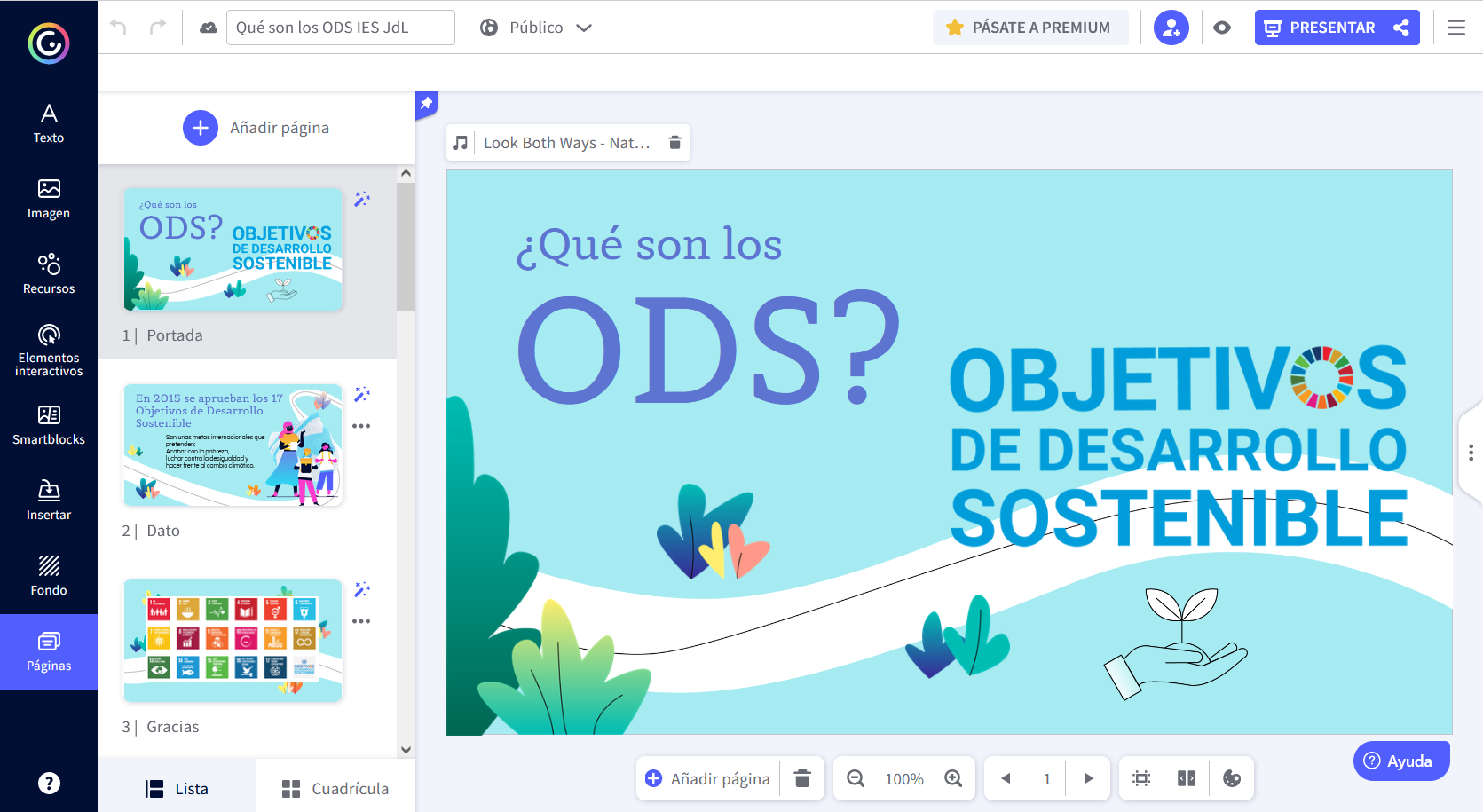
Proporciona plantillas que permiten **realizar diseños sencillos y con apariencia profesional,** pero también permite crear diseños desde cero, añadiendo imágenes, texto, animaciones, botones... **Presenta una interfaz sencilla**, a la derecha la mesa de trabajo y a la izquierda un menú desplegable en el que debes *clickar* o arrastrar los diferentes elementos hasta la composición. Además, también **dispone de un gran banco de imágenes**, ilustraciones y otros elementos gráficos, elección de **tipos de texto** y tipografía, **audio y vídeo** para enlazar o subir.

<table border="1" id="bkmrk-genially-tiene-un-bu" style="border-collapse: collapse; width: 100%;"><colgroup><col style="width: 50%;"></col><col style="width: 50%;"></col></colgroup><tbody><tr><td>Genially tiene un buen canal de youtube donde tienen muchos tutoriales en castellano.

Puedes ver este vídeo en que **en 1 minuto nos explican en qué consiste la herramienta.**

</td><td><iframe allowfullscreen="allowfullscreen" height="218" src="https://www.youtube.com/embed/ceI4DEHd3g8" style="width: 389px; height: 218px;" width="389"></iframe>

</td></tr></tbody></table>

<details id="bkmrk-echa-un-vistazo-a-la"><summary>Echa un vistazo a la interfaz de Genially</summary>

[![imachen.png](https://libros.catedu.es/uploads/images/gallery/2023-02/scaled-1680-/Pt9imachen.png)](https://libros.catedu.es/uploads/images/gallery/2023-02/Pt9imachen.png)

*Captura de pantalla | Elena I. Moncayo*

</details><p class="callout success">Usando genially podemos **aplicar a las infografías cierta interactividad para el usuario** incrustarlo fácilmente en una web o generando una serie de **etiquetas y botones**, para que cuando pasemos el puntero o hagamos *click* se abran otras ventanas de texto o aparezcan ventanas de cuadros de texto, imágenes... Es la principal fortaleza de Genially frente a otras apps como *Canva* o *Piktochart.* **Esto proporciona una navegación interactiva** y se pueden crear ''pistas'' con las que el usuario/a puede interactuar, **pudiendo aplicarla a planteamientos de situaciones de aprendizaje.** Podéis consultar el ejemplo expandiendo el recuadro de abajo: [**Situación de Aprendizaje: Entrevista de Investigación | Elena I Moncayo .**](https://app.genial.ly/editor/63f63e9351c230001366ec4b "Situación de Aprendizaje: Entrevista de Investigación")  
</p>

<span style="border-block: unset; border-inline: unset; border-start-start-radius: unset; border-start-end-radius: unset; border-end-start-radius: unset; border-end-end-radius: unset; overflow-inline: unset; overflow-block: unset; overscroll-behavior-inline: unset; overscroll-behavior-block: unset; margin-block: unset; margin-inline: unset; scroll-margin-block: unset; scroll-margin-inline: unset; padding-block: unset; padding-inline: unset; scroll-padding-block: unset; scroll-padding-inline: unset; inset-block: unset; inset-inline: unset; block-size: unset; min-block-size: unset; max-block-size: unset; inline-size: unset; min-inline-size: unset; max-inline-size: unset; contain-intrinsic-block-size: unset; contain-intrinsic-inline-size: unset; background: unset; background-blend-mode: unset; border: unset; border-radius: unset; box-decoration-break: unset; -moz-float-edge: unset; display: unset; position: fixed; float: unset; clear: unset; vertical-align: unset; overflow: unset; overflow-anchor: unset; transform: unset; rotate: unset; scale: unset; translate: unset; offset: unset; scroll-behavior: unset; scroll-snap-align: unset; scroll-snap-type: unset; scroll-snap-stop: unset; overscroll-behavior: unset; isolation: unset; break-after: unset; break-before: unset; break-inside: unset; resize: unset; perspective: unset; perspective-origin: unset; backface-visibility: unset; transform-box: unset; transform-style: unset; transform-origin: unset; contain: unset; container: unset; appearance: unset; -moz-orient: unset; will-change: unset; shape-image-threshold: unset; shape-margin: unset; shape-outside: unset; touch-action: unset; -webkit-line-clamp: unset; scrollbar-gutter: unset; columns: unset; column-fill: unset; column-rule: unset; column-span: unset; content: unset; counter-increment: unset; counter-reset: unset; counter-set: unset; opacity: unset; box-shadow: unset; clip: rect(0px, 0px, 0px, 0px); filter: unset; backdrop-filter: unset; mix-blend-mode: unset; font: unset; font-synthesis: unset; font-palette: unset; visibility: unset; writing-mode: unset; text-orientation: unset; print-color-adjust: unset; image-rendering: unset; image-orientation: unset; dominant-baseline: unset; text-anchor: unset; color-interpolation: unset; color-interpolation-filters: unset; fill: unset; fill-opacity: unset; fill-rule: unset; shape-rendering: unset; stroke: unset; stroke-width: unset; stroke-linecap: unset; stroke-linejoin: unset; stroke-miterlimit: unset; stroke-opacity: unset; stroke-dasharray: unset; stroke-dashoffset: unset; clip-rule: unset; marker: unset; paint-order: unset; border-collapse: unset; empty-cells: unset; caption-side: unset; border-spacing: unset; color: unset; text-transform: unset; hyphens: unset; -moz-text-size-adjust: unset; text-indent: unset; overflow-wrap: unset; word-break: unset; text-justify: unset; text-align-last: unset; text-align: unset; letter-spacing: unset; word-spacing: unset; white-space: pre; text-shadow: unset; text-emphasis: unset; text-emphasis-position: unset; tab-size: unset; line-break: unset; -webkit-text-fill-color: unset; -webkit-text-stroke: unset; ruby-align: unset; ruby-position: unset; text-combine-upright: unset; text-rendering: unset; text-underline-offset: unset; text-underline-position: unset; text-decoration-skip-ink: unset; hyphenate-character: unset; cursor: unset; pointer-events: unset; -moz-user-input: unset; -moz-user-modify: unset; -moz-user-focus: unset; caret-color: unset; accent-color: unset; color-scheme: unset; scrollbar-color: unset; list-style: unset; quotes: unset; -moz-image-region: unset; margin: unset; overflow-clip-margin: unset; scroll-margin: unset; outline: unset; outline-offset: unset; page: unset; padding: unset; scroll-padding: unset; top: 0px; right: unset; bottom: unset; left: unset; z-index: unset; flex-flow: unset; place-content: unset; place-items: unset; flex: unset; place-self: unset; order: unset; width: unset; min-width: unset; max-width: unset; height: unset; min-height: unset; max-height: unset; box-sizing: unset; object-fit: unset; object-position: unset; grid-area: unset; grid: unset; gap: unset; aspect-ratio: unset; contain-intrinsic-size: unset; vector-effect: unset; stop-color: unset; stop-opacity: unset; flood-color: unset; flood-opacity: unset; lighting-color: unset; mask-type: unset; clip-path: unset; mask: unset; x: unset; y: unset; cx: unset; cy: unset; rx: unset; ry: unset; r: unset; d: unset; table-layout: unset; text-overflow: unset; text-decoration: unset; ime-mode: unset; scrollbar-width: unset; user-select: text; -moz-window-dragging: unset; -moz-force-broken-image-icon: unset; transition: unset; animation: unset; -moz-box-align: unset; -moz-box-direction: unset; -moz-box-flex: unset; -moz-box-orient: unset; -moz-box-pack: unset; -moz-box-ordinal-group: unset;">&lt;div style="width: 100%;"&gt;&lt;div style="position: relative; padding-bottom: 200.00%; padding-top: 0; height: 0;"&gt;&lt;iframe title="Entrevista de investigación a cocina" frameborder="0" width="800" height="1600" style="position: absolute; top: 0; left: 0; width: 100%; height: 100%;" src="https://view.genial.ly/63f63e9351c230001366ec4b" type="text/html" allowscriptaccess="always" allowfullscreen="true" scrolling="yes" allownetworking="all"&gt;&lt;/iframe&gt; &lt;/div&gt; &lt;/div&gt;</span><span style="border-block: unset; border-inline: unset; border-start-start-radius: unset; border-start-end-radius: unset; border-end-start-radius: unset; border-end-end-radius: unset; overflow-inline: unset; overflow-block: unset; overscroll-behavior-inline: unset; overscroll-behavior-block: unset; margin-block: unset; margin-inline: unset; scroll-margin-block: unset; scroll-margin-inline: unset; padding-block: unset; padding-inline: unset; scroll-padding-block: unset; scroll-padding-inline: unset; inset-block: unset; inset-inline: unset; block-size: unset; min-block-size: unset; max-block-size: unset; inline-size: unset; min-inline-size: unset; max-inline-size: unset; contain-intrinsic-block-size: unset; contain-intrinsic-inline-size: unset; background: unset; background-blend-mode: unset; border: unset; border-radius: unset; box-decoration-break: unset; -moz-float-edge: unset; display: unset; position: fixed; float: unset; clear: unset; vertical-align: unset; overflow: unset; overflow-anchor: unset; transform: unset; rotate: unset; scale: unset; translate: unset; offset: unset; scroll-behavior: unset; scroll-snap-align: unset; scroll-snap-type: unset; scroll-snap-stop: unset; overscroll-behavior: unset; isolation: unset; break-after: unset; break-before: unset; break-inside: unset; resize: unset; perspective: unset; perspective-origin: unset; backface-visibility: unset; transform-box: unset; transform-style: unset; transform-origin: unset; contain: unset; container: unset; appearance: unset; -moz-orient: unset; will-change: unset; shape-image-threshold: unset; shape-margin: unset; shape-outside: unset; touch-action: unset; -webkit-line-clamp: unset; scrollbar-gutter: unset; columns: unset; column-fill: unset; column-rule: unset; column-span: unset; content: unset; counter-increment: unset; counter-reset: unset; counter-set: unset; opacity: unset; box-shadow: unset; clip: rect(0px, 0px, 0px, 0px); filter: unset; backdrop-filter: unset; mix-blend-mode: unset; font: unset; font-synthesis: unset; font-palette: unset; visibility: unset; writing-mode: unset; text-orientation: unset; print-color-adjust: unset; image-rendering: unset; image-orientation: unset; dominant-baseline: unset; text-anchor: unset; color-interpolation: unset; color-interpolation-filters: unset; fill: unset; fill-opacity: unset; fill-rule: unset; shape-rendering: unset; stroke: unset; stroke-width: unset; stroke-linecap: unset; stroke-linejoin: unset; stroke-miterlimit: unset; stroke-opacity: unset; stroke-dasharray: unset; stroke-dashoffset: unset; clip-rule: unset; marker: unset; paint-order: unset; border-collapse: unset; empty-cells: unset; caption-side: unset; border-spacing: unset; color: unset; text-transform: unset; hyphens: unset; -moz-text-size-adjust: unset; text-indent: unset; overflow-wrap: unset; word-break: unset; text-justify: unset; text-align-last: unset; text-align: unset; letter-spacing: unset; word-spacing: unset; white-space: pre; text-shadow: unset; text-emphasis: unset; text-emphasis-position: unset; tab-size: unset; line-break: unset; -webkit-text-fill-color: unset; -webkit-text-stroke: unset; ruby-align: unset; ruby-position: unset; text-combine-upright: unset; text-rendering: unset; text-underline-offset: unset; text-underline-position: unset; text-decoration-skip-ink: unset; hyphenate-character: unset; cursor: unset; pointer-events: unset; -moz-user-input: unset; -moz-user-modify: unset; -moz-user-focus: unset; caret-color: unset; accent-color: unset; color-scheme: unset; scrollbar-color: unset; list-style: unset; quotes: unset; -moz-image-region: unset; margin: unset; overflow-clip-margin: unset; scroll-margin: unset; outline: unset; outline-offset: unset; page: unset; padding: unset; scroll-padding: unset; top: 0px; right: unset; bottom: unset; left: unset; z-index: unset; flex-flow: unset; place-content: unset; place-items: unset; flex: unset; place-self: unset; order: unset; width: unset; min-width: unset; max-width: unset; height: unset; min-height: unset; max-height: unset; box-sizing: unset; object-fit: unset; object-position: unset; grid-area: unset; grid: unset; gap: unset; aspect-ratio: unset; contain-intrinsic-size: unset; vector-effect: unset; stop-color: unset; stop-opacity: unset; flood-color: unset; flood-opacity: unset; lighting-color: unset; mask-type: unset; clip-path: unset; mask: unset; x: unset; y: unset; cx: unset; cy: unset; rx: unset; ry: unset; r: unset; d: unset; table-layout: unset; text-overflow: unset; text-decoration: unset; ime-mode: unset; scrollbar-width: unset; user-select: text; -moz-window-dragging: unset; -moz-force-broken-image-icon: unset; transition: unset; animation: unset; -moz-box-align: unset; -moz-box-direction: unset; -moz-box-flex: unset; -moz-box-orient: unset; -moz-box-pack: unset; -moz-box-ordinal-group: unset;">&lt;div style="width: 100%;"&gt;&lt;div style="position: relative; padding-bottom: 200.00%; padding-top: 0; height: 0;"&gt;&lt;iframe title="Entrevista de investigación a cocina" frameborder="0" width="800" height="1600" style="position: absolute; top: 0; left: 0; width: 100%; height: 100%;" src="https://view.genial.ly/63f63e9351c230001366ec4b" type="text/html" allowscriptaccess="always" allowfullscreen="true" scrolling="yes" allownetworking="all"&gt;&lt;/iframe&gt; &lt;/div&gt; &lt;/div</span>

<details id="bkmrk-situaci%C3%B3n-de-aprendi"><summary>Situación de Aprendizaje: Entrevista de Investigación | Elena I Moncayo.</summary>

Ejemplo de propuesta con información para desarrollar una situación de aprendizaje: prueba a mover el cursor sobre los elementos o a hacer click en ellos.

<div style="width: 100%;"><div style="position: relative; padding-bottom: 200%; padding-top: 0; height: 0;"><iframe allowfullscreen="allowfullscreen" frameborder="0" height="1600px" scrolling="yes" src="https://view.genial.ly/63f63e9351c230001366ec4b" style="position: absolute; top: 0; left: 0; width: 100%; height: 100%;" title="Entrevista de investigación a cocina" width="800px"></iframe>

</div></div></details><p class="callout warning">Ten en cuenta que **esta aplicación está principalmente pensada para diseñar contenidos en formato digital que puedes incrustar en páginas web, proyectar o mostrar online en diferentes sistema de gestión de aprendizaje (LMS)**, copiando la *url* y no para diseñar creatividades que quieras imprimir en formato papel. Para poder descargarlo o bien como PDF interactivo o bien como Imagen JPG has de tener cuenta premium, y no es gratuita.</p>

En esta *app online*  encontramos un gran surtido de **plantillas prediseñadas** que nos sirven de base para simplemente editar o modificarlas a nuestro antojo o **podemos iniciar proyectos desde cero** aplicando las diferentes opciones de texto e imagen como prefiramos ejerciendo nuestro criterio. **El concepto de la app es *freemium*** por lo tanto, a priori la podemos usar de manera **gratuita con limitaciones** que se desbloquean con la cuenta *premium*.

<p class="callout danger">Para adquirir una cuenta *premium* debemos abonarnos. **Usaremos en este curso solamente las opciones gratuitas.**  
</p>

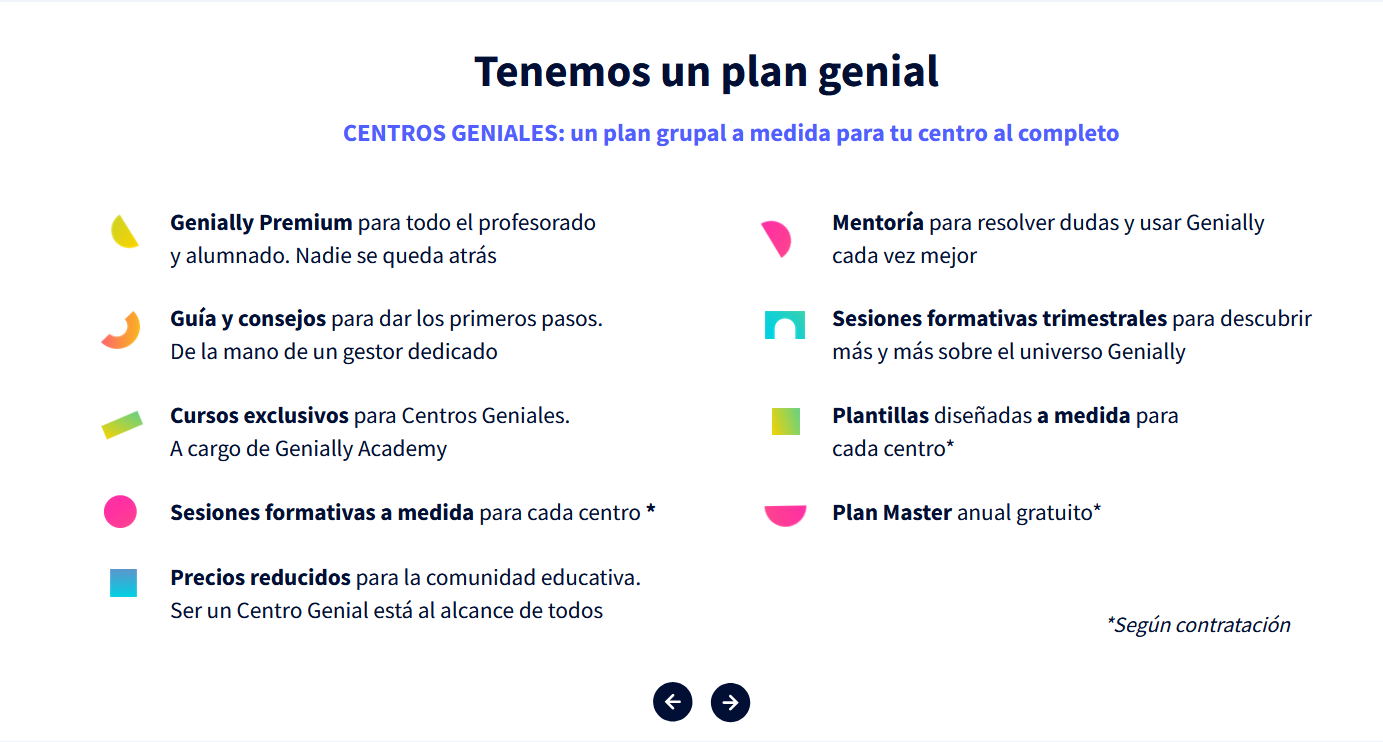
<details id="bkmrk-tipos-de-abono-premi"><summary>Tipos de abono premium en genially y planes educativos para centros:</summary>

[En esta captura se muestran tres tipos de abono *premium.*![imachen.png](https://libros.catedu.es/uploads/images/gallery/2023-02/scaled-1680-/DJwimachen.png)](https://libros.catedu.es/uploads/images/gallery/2023-02/DJwimachen.png)
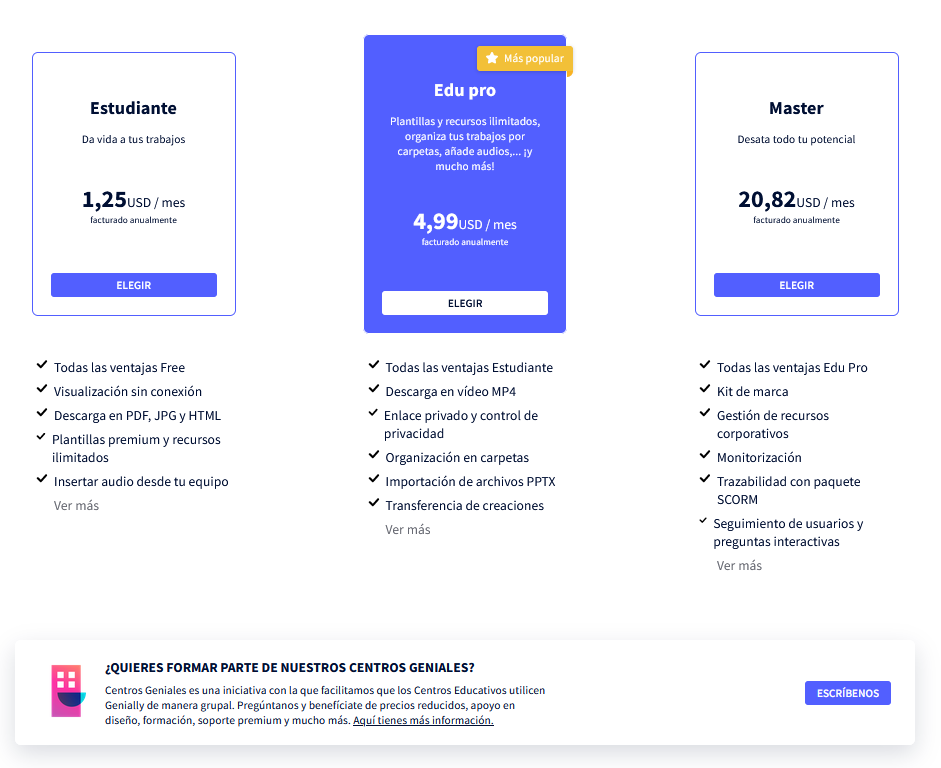
Ofrecen una suscripción a ''Centros geniales'' para instituciones en las que ofrecen algunos servicios según contratación.

[![imachen.png](https://libros.catedu.es/uploads/images/gallery/2023-02/scaled-1680-/Ec8imachen.png)](https://libros.catedu.es/uploads/images/gallery/2023-02/Ec8imachen.png)
</details><div class="iDevice emphasis0" id="bkmrk--2" style="margin-top: 0px;"><div class="block iDevice_content" id="bkmrk--4"></div></div><p class="callout info">Con toda esta información ya puedes decidir si Genially responde a tus necesidades y objetivos para tu contenido digital educativo, así que pasamos ahora a la siguiente página dónde vamos a explicar su uso y veremos algunos tutoriales.</p>