# 2. Exploramos nuestro entorno de trabajo en la plataforma:

<span style="font-size: 11pt; font-family: Arial; color: #000000; background-color: transparent; font-weight: 400; font-style: normal; font-variant: normal; text-decoration: none; vertical-align: baseline; white-space: pre-wrap;">Cuando entramos en la plataforma, accedemos directamente al </span><span style="font-size: 11pt; font-family: Arial; color: #000000; background-color: transparent; font-weight: bold; font-style: normal; font-variant: normal; text-decoration: none; vertical-align: baseline; white-space: pre-wrap;">Área personal</span><span style="font-size: 11pt; font-family: Arial; color: #000000; background-color: transparent; font-weight: 400; font-style: normal; font-variant: normal; text-decoration: none; vertical-align: baseline; white-space: pre-wrap;">, donde aparecerá una </span><span style="font-size: 11pt; font-family: Arial; color: #000000; background-color: transparent; font-weight: 400; font-style: italic; font-variant: normal; text-decoration: none; vertical-align: baseline; white-space: pre-wrap;">Línea del tiempo</span><span style="font-size: 11pt; font-family: Arial; color: #000000; background-color: transparent; font-weight: 400; font-style: normal; font-variant: normal; text-decoration: none; vertical-align: baseline; white-space: pre-wrap;"> con los próximos eventos y por debajo de ella el </span><span style="font-size: 11pt; font-family: Arial; color: #000000; background-color: transparent; font-weight: 400; font-style: italic; font-variant: normal; text-decoration: none; vertical-align: baseline; white-space: pre-wrap;">Calendario </span><span style="font-size: 11pt; font-family: Arial; color: #000000; background-color: transparent; font-weight: 400; font-style: normal; font-variant: normal; text-decoration: none; vertical-align: baseline; white-space: pre-wrap;">del mes actual, donde tenemos una vista más amplia de los próximos eventos.</span>

<span style="font-size: 11pt; font-family: Arial; color: #000000; background-color: transparent; font-weight: 400; font-style: normal; font-variant: normal; text-decoration: none; vertical-align: baseline; white-space: pre-wrap;">Nos fijamos ahora en la estructura de la página y vemos las siguientes áreas:</span>

## <span style="font-size: 16pt; font-family: Arial; color: #000000; background-color: transparent; font-weight: 400; font-style: normal; font-variant: normal; text-decoration: none; vertical-align: baseline; white-space: pre-wrap;">Cabecera </span>

<span style="font-size: 11pt; font-family: Arial; color: #000000; background-color: transparent; font-weight: 400; font-style: normal; font-variant: normal; text-decoration: none; vertical-align: baseline; white-space: pre-wrap;">Siempre visible y accesible desde cualquier punto de la plataforma.</span>

<span style="font-size: 11pt; font-family: Arial; color: #000000; background-color: transparent; font-weight: 400; font-style: normal; font-variant: normal; text-decoration: none; vertical-align: baseline; white-space: pre-wrap;">En la </span><span style="font-size: 11pt; font-family: Arial; color: #000000; background-color: transparent; font-weight: bold; font-style: normal; font-variant: normal; text-decoration: none; vertical-align: baseline; white-space: pre-wrap;">zona izquierda de la cabecera</span><span style="font-size: 11pt; font-family: Arial; color: #000000; background-color: transparent; font-weight: 400; font-style: normal; font-variant: normal; text-decoration: none; vertical-align: baseline; white-space: pre-wrap;"> hay unos enlaces de navegación que nos permiten movernos entre la </span><span style="font-size: 11pt; font-family: Arial; color: #000000; background-color: transparent; font-weight: 400; font-style: italic; font-variant: normal; text-decoration: none; vertical-align: baseline; white-space: pre-wrap;">Página Principal</span><span style="font-size: 11pt; font-family: Arial; color: #000000; background-color: transparent; font-weight: 400; font-style: normal; font-variant: normal; text-decoration: none; vertical-align: baseline; white-space: pre-wrap;">, nuestro </span><span style="font-size: 11pt; font-family: Arial; color: #000000; background-color: transparent; font-weight: 400; font-style: italic; font-variant: normal; text-decoration: none; vertical-align: baseline; white-space: pre-wrap;">Área personal</span><span style="font-size: 11pt; font-family: Arial; color: #000000; background-color: transparent; font-weight: 400; font-style: normal; font-variant: normal; text-decoration: none; vertical-align: baseline; white-space: pre-wrap;"> y la sección </span><span style="font-size: 11pt; font-family: Arial; color: #000000; background-color: transparent; font-weight: 400; font-style: italic; font-variant: normal; text-decoration: none; vertical-align: baseline; white-space: pre-wrap;">Mis cursos</span><span style="font-size: 11pt; font-family: Arial; color: #000000; background-color: transparent; font-weight: 400; font-style: normal; font-variant: normal; text-decoration: none; vertical-align: baseline; white-space: pre-wrap;">. Si clicamos en el logo Aeducar, siempre nos llevará a la </span><span style="font-size: 11pt; font-family: Arial; color: #000000; background-color: transparent; font-weight: 400; font-style: italic; font-variant: normal; text-decoration: none; vertical-align: baseline; white-space: pre-wrap;">Página Principal</span><span style="font-size: 11pt; font-family: Arial; color: #000000; background-color: transparent; font-weight: 400; font-style: normal; font-variant: normal; text-decoration: none; vertical-align: baseline; white-space: pre-wrap;">.</span>

[![image.png](https://libros.catedu.es/uploads/images/gallery/2023-05/scaled-1680-/mICimage.png)](https://libros.catedu.es/uploads/images/gallery/2023-05/mICimage.png)

<span style="font-size: 11pt; font-family: Arial; color: #000000; background-color: transparent; font-weight: 400; font-style: normal; font-variant: normal; text-decoration: none; vertical-align: baseline; white-space: pre-wrap;">En la </span><span style="font-size: 11pt; font-family: Arial; color: #000000; background-color: transparent; font-weight: bold; font-style: normal; font-variant: normal; text-decoration: none; vertical-align: baseline; white-space: pre-wrap;">zona derecha de la cabecera</span><span style="font-size: 11pt; font-family: Arial; color: #000000; background-color: transparent; font-weight: 400; font-style: normal; font-variant: normal; text-decoration: none; vertical-align: baseline; white-space: pre-wrap;"> encontramos el siguiente menú de iconos:</span>

[![image.png](https://libros.catedu.es/uploads/images/gallery/2023-05/scaled-1680-/bJdimage.png)](https://libros.catedu.es/uploads/images/gallery/2023-05/bJdimage.png)

[![image.png](https://libros.catedu.es/uploads/images/gallery/2023-05/scaled-1680-/6wximage.png)](https://libros.catedu.es/uploads/images/gallery/2023-05/6wximage.png)<span style="font-size: 11pt; font-family: Arial; color: #000000; background-color: transparent; font-weight: 400; font-style: normal; font-variant: normal; text-decoration: none; vertical-align: baseline; white-space: pre-wrap;"> </span><span style="font-size: 11pt; font-family: Arial; color: #000000; background-color: transparent; font-weight: bold; font-style: normal; font-variant: normal; text-decoration: none; vertical-align: baseline; white-space: pre-wrap;">Búsqueda.</span><span style="font-size: 11pt; font-family: Arial; color: #000000; background-color: transparent; font-weight: 400; font-style: normal; font-variant: normal; text-decoration: none; vertical-align: baseline; white-space: pre-wrap;"> Muy útil para localizar elementos o contenidos.</span>

[![image.png](https://libros.catedu.es/uploads/images/gallery/2023-05/scaled-1680-/lqqimage.png)](https://libros.catedu.es/uploads/images/gallery/2023-05/lqqimage.png)<span style="font-size: 11pt; font-family: Arial; color: #000000; background-color: transparent; font-weight: bold; font-style: normal; font-variant: normal; text-decoration: none; vertical-align: baseline; white-space: pre-wrap;">Notificaciones</span><span style="font-size: 11pt; font-family: Arial; color: #000000; background-color: transparent; font-weight: 400; font-style: normal; font-variant: normal; text-decoration: none; vertical-align: baseline; white-space: pre-wrap;">. Si tenemos avisos de actividad en nuestros cursos nos lo marcará aquí. Desde aquí podremos configurar las preferencias de notificación. </span>

[![image.png](https://libros.catedu.es/uploads/images/gallery/2023-05/scaled-1680-/YDvimage.png)](https://libros.catedu.es/uploads/images/gallery/2023-05/YDvimage.png)<span style="font-size: 11pt; font-family: Arial; color: #000000; background-color: transparent; font-weight: bold; font-style: normal; font-variant: normal; text-decoration: none; vertical-align: baseline; white-space: pre-wrap;"> Mensajería estándar de moodle</span><span style="font-size: 11pt; font-family: Arial; color: #000000; background-color: transparent; font-weight: 400; font-style: normal; font-variant: normal; text-decoration: none; vertical-align: baseline; white-space: pre-wrap;">. Desde aquí podremos consultar los mensajes recibidos y escribir a otras personas usuarias de nuestro Aeducar. Formato similar a un chat de texto donde podemos usar enlaces.</span>

[![image.png](https://libros.catedu.es/uploads/images/gallery/2023-05/scaled-1680-/9iKimage.png)](https://libros.catedu.es/uploads/images/gallery/2023-05/9iKimage.png)<span style="font-size: 11pt; font-family: Arial; color: #000000; background-color: transparent; font-weight: bold; font-style: normal; font-variant: normal; text-decoration: none; vertical-align: baseline; white-space: pre-wrap;">Correo electrónico.</span><span style="font-size: 11pt; font-family: Arial; color: #000000; background-color: transparent; font-weight: 400; font-style: normal; font-variant: normal; text-decoration: none; vertical-align: baseline; white-space: pre-wrap;"> Servicio de mensajería para comunicarnos con participantes (otros profesores, estudiantes) de nuestros cursos. Admite adjuntos e imágenes.</span>

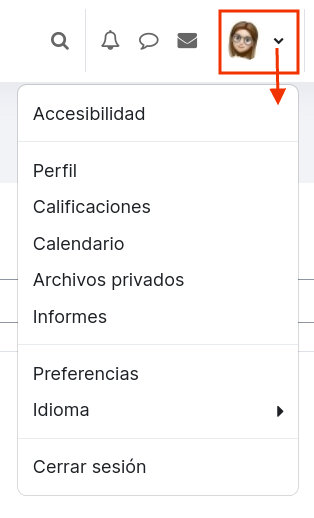
[![image.png](https://libros.catedu.es/uploads/images/gallery/2023-05/scaled-1680-/flQimage.png)](https://libros.catedu.es/uploads/images/gallery/2023-05/flQimage.png)<span style="font-size: 11pt; font-family: Arial; color: #000000; background-color: transparent; font-weight: bold; font-style: normal; font-variant: normal; text-decoration: none; vertical-align: baseline; white-space: pre-wrap;"> Perfil de usuario.</span><span style="font-size: 11pt; font-family: Arial; color: #000000; background-color: transparent; font-weight: 400; font-style: normal; font-variant: normal; text-decoration: none; vertical-align: baseline; white-space: pre-wrap;"> Desde aquí desplegamos el siguiente menú desde donde podremos configurar opciones personales para el uso de la plataforma. </span>

[![image.png](https://libros.catedu.es/uploads/images/gallery/2023-05/scaled-1680-/C56image.png)](https://libros.catedu.es/uploads/images/gallery/2023-05/C56image.png)

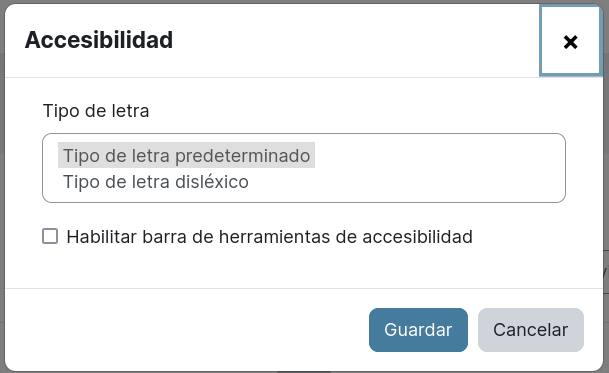
- <span style="font-size: 11pt; font-family: Arial; color: #000000; background-color: transparent; font-weight: bold; font-style: normal; font-variant: normal; text-decoration: none; vertical-align: baseline; white-space: pre-wrap;">Accesibilidad</span><span style="font-size: 11pt; font-family: Arial; color: #000000; background-color: transparent; font-weight: 400; font-style: normal; font-variant: normal; text-decoration: none; vertical-align: baseline; white-space: pre-wrap;">: para activar la barra de herramientas de accesibilidad o seleccionar tipo de letra específico para la dislexia.</span>

[![image.png](https://libros.catedu.es/uploads/images/gallery/2023-05/scaled-1680-/k9Cimage.png)](https://libros.catedu.es/uploads/images/gallery/2023-05/k9Cimage.png)

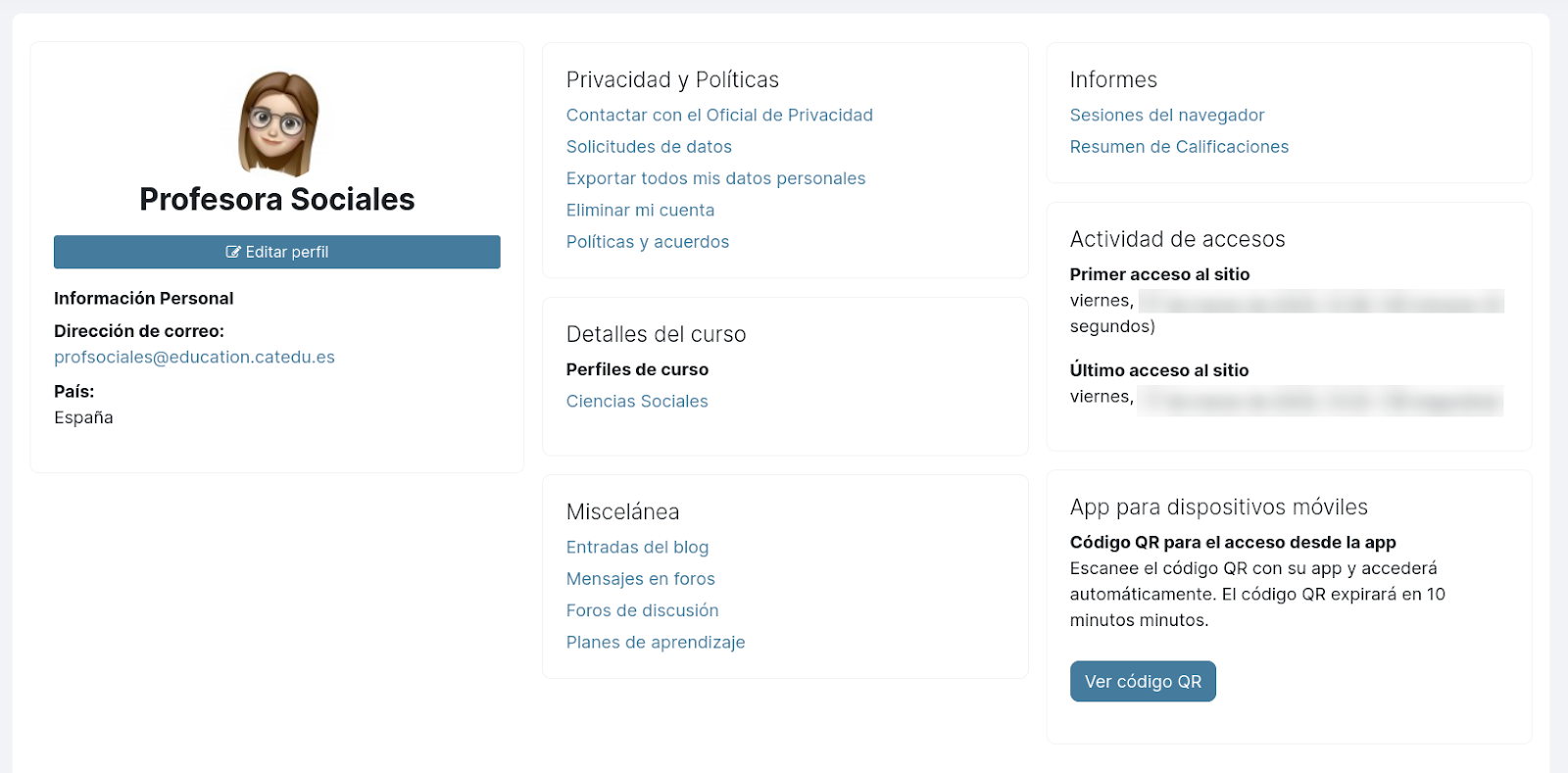
- <span style="font-size: 11pt; font-family: Arial; color: #000000; background-color: transparent; font-weight: bold; font-style: normal; font-variant: normal; text-decoration: none; vertical-align: baseline; white-space: pre-wrap;">Perfil</span><span style="font-size: 11pt; font-family: Arial; color: #000000; background-color: transparent; font-weight: 400; font-style: normal; font-variant: normal; text-decoration: none; vertical-align: baseline; white-space: pre-wrap;">: desde aquí podremos modificar datos de nuestro perfil, así como otro tipo de consultas asociadas a nuestro usuario: cursos, blogs, informes, datos...</span>

[![image.png](https://libros.catedu.es/uploads/images/gallery/2023-05/scaled-1680-/Ye1image.png)](https://libros.catedu.es/uploads/images/gallery/2023-05/Ye1image.png)

- <span style="font-size: 11pt; font-family: Arial; color: #000000; background-color: transparent; font-weight: bold; font-style: normal; font-variant: normal; text-decoration: none; vertical-align: baseline; white-space: pre-wrap;">Calificaciones</span><span style="font-size: 11pt; font-family: Arial; color: #000000; background-color: transparent; font-weight: 400; font-style: normal; font-variant: normal; text-decoration: none; vertical-align: baseline; white-space: pre-wrap;">: acceso rápido a los libros de calificaciones de nuestros cursos.</span>
- <span style="font-size: 11pt; font-family: Arial; color: #000000; background-color: transparent; font-weight: bold; font-style: normal; font-variant: normal; text-decoration: none; vertical-align: baseline; white-space: pre-wrap;">Calendario</span><span style="font-size: 11pt; font-family: Arial; color: #000000; background-color: transparent; font-weight: 400; font-style: normal; font-variant: normal; text-decoration: none; vertical-align: baseline; white-space: pre-wrap;">.</span>
- <span style="font-size: 11pt; font-family: Arial; color: #000000; background-color: transparent; font-weight: bold; font-style: normal; font-variant: normal; text-decoration: none; vertical-align: baseline; white-space: pre-wrap;">Archivos privados:</span><span style="font-size: 11pt; font-family: Arial; color: #000000; background-color: transparent; font-weight: 400; font-style: normal; font-variant: normal; text-decoration: none; vertical-align: baseline; white-space: pre-wrap;"> zona personal donde podemos subir archivos para tenerlos en la nube.</span>
- <span style="font-size: 11pt; font-family: Arial; color: #000000; background-color: transparent; font-weight: bold; font-style: normal; font-variant: normal; text-decoration: none; vertical-align: baseline; white-space: pre-wrap;">Informes:</span><span style="font-size: 11pt; font-family: Arial; color: #000000; background-color: transparent; font-weight: 400; font-style: normal; font-variant: normal; text-decoration: none; vertical-align: baseline; white-space: pre-wrap;"> aquí se mostrarán los informes a los que tenga acceso nuestro usuario. Desde la administración de la plataforma es desde donde se pueden configurar dichos informes.</span>
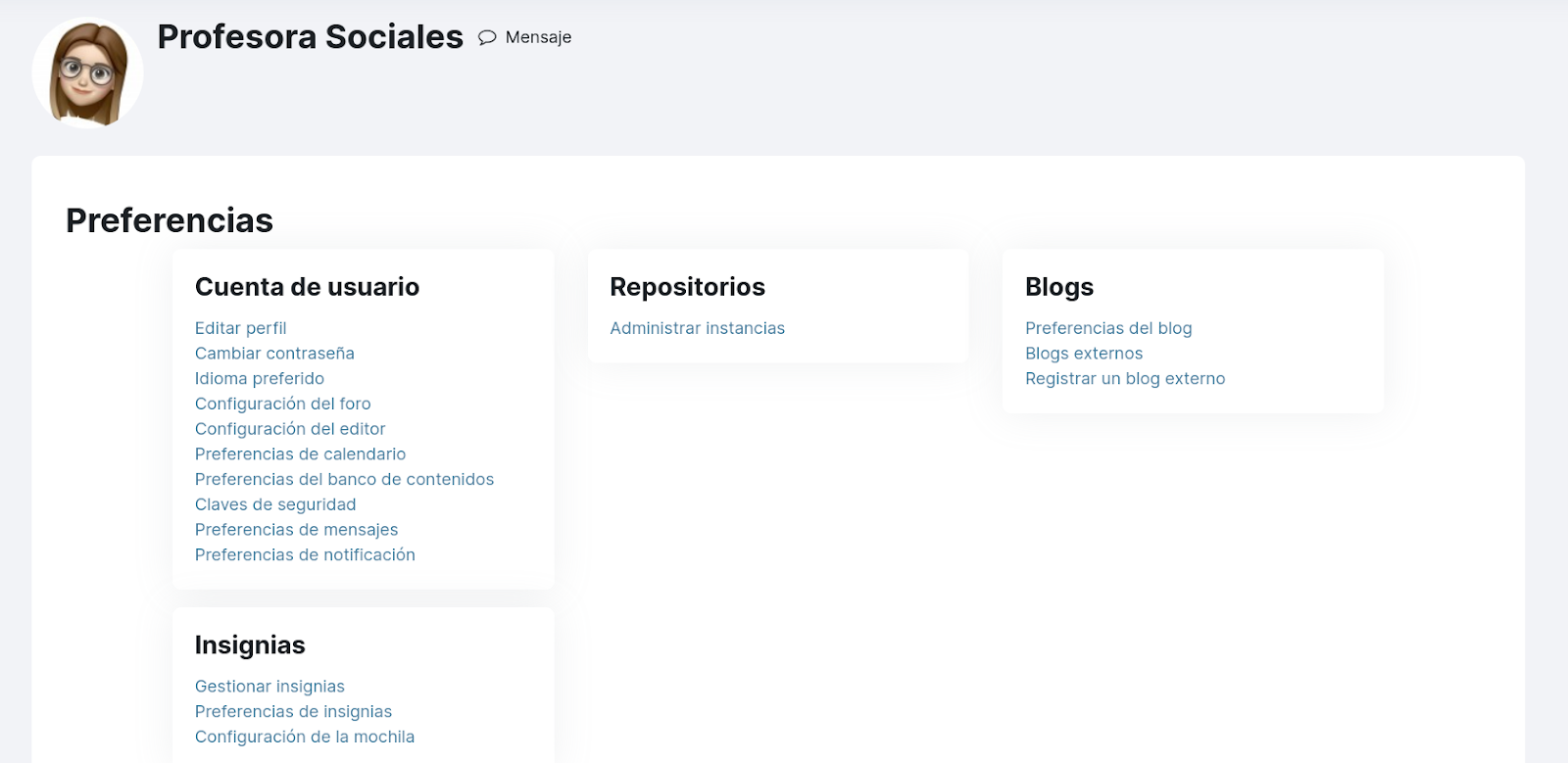
- <span style="font-size: 11pt; font-family: Arial; color: #000000; background-color: transparent; font-weight: bold; font-style: normal; font-variant: normal; text-decoration: none; vertical-align: baseline; white-space: pre-wrap;">Preferencias</span><span style="font-size: 11pt; font-family: Arial; color: #000000; background-color: transparent; font-weight: 400; font-style: normal; font-variant: normal; text-decoration: none; vertical-align: baseline; white-space: pre-wrap;">: página desde donde podemos modiifcar características tales como la contraseña, el idioma por defecto, las preferencias de notificación... etc.</span>

[![image.png](https://libros.catedu.es/uploads/images/gallery/2023-05/scaled-1680-/s6mimage.png)](https://libros.catedu.es/uploads/images/gallery/2023-05/s6mimage.png)

- <span style="font-size: 11pt; font-family: Arial; color: #000000; background-color: transparent; font-weight: bold; font-style: normal; font-variant: normal; text-decoration: none; vertical-align: baseline; white-space: pre-wrap;">Idioma</span><span style="font-size: 11pt; font-family: Arial; color: #000000; background-color: transparent; font-weight: 400; font-style: normal; font-variant: normal; text-decoration: none; vertical-align: baseline; white-space: pre-wrap;">: despliega el selector de idiomas desde el que elegiremos el que queremos para la plataforma. Si necesitas algún idioma que no aparezca en este listado, puedes solicitar su instalación escribiendo a soporteaeducar@educa.aragon.es.</span>
- <span style="font-size: 11pt; font-family: Arial; color: #000000; background-color: transparent; font-weight: bold; font-style: normal; font-variant: normal; text-decoration: none; vertical-align: baseline; white-space: pre-wrap;">Cerrar sesión</span><span style="font-size: 11pt; font-family: Arial; color: #000000; background-color: transparent; font-weight: 400; font-style: normal; font-variant: normal; text-decoration: none; vertical-align: baseline; white-space: pre-wrap;">: importante no saltarnos este paso sobre todo cuando trabajamos en ordenadores compartidos, y ya no digamos en ordenadores de aula. Cerrar sesión evita que otro usuario que acceda a posteriori, lo haga con tu usuario pudiendo consulta/modificar cualquier característica de tus cursos, incluido los libros de calificaciones de tus cursos.</span>

## <span style="font-size: 16pt; font-family: Arial; color: #000000; background-color: transparent; font-weight: 400; font-style: normal; font-variant: normal; text-decoration: none; vertical-align: baseline; white-space: pre-wrap;">Zona principal</span>

<span style="font-size: 11pt; font-family: Arial; color: #000000; background-color: transparent; font-weight: 400; font-style: normal; font-variant: normal; text-decoration: none; vertical-align: baseline; white-space: pre-wrap;">Por debajo de la cabecera que acabamos de describir encontramos la </span><span style="font-size: 11pt; font-family: Arial; color: #000000; background-color: transparent; font-weight: bold; font-style: normal; font-variant: normal; text-decoration: none; vertical-align: baseline; white-space: pre-wrap;">zona principal </span><span style="font-size: 11pt; font-family: Arial; color: #000000; background-color: transparent; font-weight: 400; font-style: normal; font-variant: normal; text-decoration: none; vertical-align: baseline; white-space: pre-wrap;">que comprende toda la anchura de la página y que es la zona en la que aparecerá el contenido de las distintas páginas por las que vayamos navegando. </span>

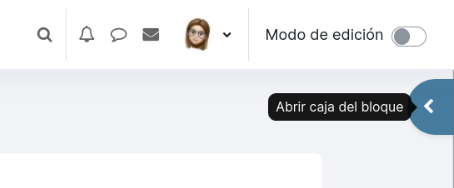
<span style="font-size: 11pt; font-family: Arial; color: #000000; background-color: transparent; font-weight: 400; font-style: normal; font-variant: normal; text-decoration: none; vertical-align: baseline; white-space: pre-wrap;">En algunas de las páginas de la plataforma puede que tengamos configurados bloques: pequeñas áreas con diversas funcionalidades que nos ayudan en el trabajo diario con la plataforma: calendario, usuarios en línea, actividad reciente.... Estos bloques aparecerán en la zona derecha de la página que podemos mostrar/ocultar según necesitemos</span>

<span style="font-size: 11pt; font-family: Arial; color: #000000; background-color: transparent; font-weight: 400; font-style: normal; font-variant: normal; text-decoration: none; vertical-align: baseline; white-space: pre-wrap;">Conforme naveguemos por la plataforma, en la </span><span style="font-size: 11pt; font-family: Arial; color: #000000; background-color: transparent; font-weight: bold; font-style: normal; font-variant: normal; text-decoration: none; vertical-align: baseline; white-space: pre-wrap;">zona de la derecha</span><span style="font-size: 11pt; font-family: Arial; color: #000000; background-color: transparent; font-weight: 400; font-style: normal; font-variant: normal; text-decoration: none; vertical-align: baseline; white-space: pre-wrap;"> aparecerá otro </span><span style="font-size: 11pt; font-family: Arial; color: #000000; background-color: transparent; font-weight: bold; font-style: normal; font-variant: normal; text-decoration: none; vertical-align: baseline; white-space: pre-wrap;">menú lateral de bloques</span><span style="font-size: 11pt; font-family: Arial; color: #000000; background-color: transparent; font-weight: 400; font-style: normal; font-variant: normal; text-decoration: none; vertical-align: baseline; white-space: pre-wrap;">, que son una serie de pequeñas áreas con diversas funcionalidades que nos ayudan en el trabajo diario con la plataforma: calendario, usuarios en línea, actividad reciente... Lo veremos en más detalle en el tema 4 de este curso.</span>

<span style="font-size: 11pt; font-family: Arial; color: #000000; background-color: transparent; font-weight: 400; font-style: normal; font-variant: normal; text-decoration: none; vertical-align: baseline; white-space: pre-wrap;">Esta zona la podremos mostrar/ocultar pulsando el icono que aparece en la siguiente image: </span>

[![image.png](https://libros.catedu.es/uploads/images/gallery/2023-05/scaled-1680-/JvHimage.png)](https://libros.catedu.es/uploads/images/gallery/2023-05/JvHimage.png)

<span style="font-size: 11pt; font-family: Arial; color: #000000; background-color: transparent; font-weight: 400; font-style: normal; font-variant: normal; text-decoration: none; vertical-align: baseline; white-space: pre-wrap;"><span style="width: 100px; display: inline-block; position: relative;">  
</span></span>