# Programas

# Sigue Bola

<span style="color: rgb(0, 0, 0);">El programa es sencillo:</span>

- <span style="color: rgb(0, 0, 0);">Instalar la extensión PlanetX AI</span>
- <span style="color: rgb(0, 0, 0);">Al empezar el programa, inicializa la cámara en modo sigue reconocer bola</span>
- <span style="color: rgb(0, 0, 0);">Si el tamaño de la bola es menor de 100 significa que la bola esta lejos</span>
    - <span style="color: rgb(0, 0, 0);">Si la coordenada X es menor que 80 significa que esta a la izquierda, luego gira a la izquierda</span>
    - <span style="color: rgb(0, 0, 0);">Si la coordenada X es mayor que 144 significa que esta a la derecha, luego gira a la derecha</span>
- <span style="color: rgb(0, 0, 0);">Si el tamaño de la bola es mayor de 100 significa que esta cerca luego para</span>

<div id="bkmrk-" style="position: relative; height: 0; padding-bottom: 70%; overflow: hidden;"><iframe frameborder="0" sandbox="allow-popups allow-forms allow-scripts allow-same-origin" src="https://makecode.microbit.org/#pub:S54776-93008-72544-57713" style="position: absolute; top: 0; left: 0; width: 100%; height: 100%;"></iframe>

</div>Fuente [https://www.elecfreaks.com/learn-en/microbitKit/smart\_cutebot/cutebot%2BAI%20lens/cutebot\_case19.html](https://www.elecfreaks.com/learn-en/microbitKit/smart_cutebot/cutebot%2BAI%20lens/cutebot_case19.html)

No va muy preciso pero sigue la bola

  
<iframe allow="accelerometer; autoplay; clipboard-write; encrypted-media; gyroscope; picture-in-picture; web-share" allowfullscreen="allowfullscreen" frameborder="0" height="849" src="https://www.youtube.com/embed/3QEfyPHEqEk" title="SIGUE BOLAS CUTE BOT AI LENS" width="478"></iframe>

# Sigue líneas

##### <span style="color: rgb(22, 145, 121);">**SIGUE LÍNEAS**</span>  


<span style="color: rgb(0, 0, 0);">El programa es sencillo, inicializo la cámara en modo "tracking" y en el bucle del programa si va hacia la derecha, giro a la derecha, si ...</span>

<div id="bkmrk--1" style="position: relative; height: 0; padding-bottom: 70%; overflow: hidden;">SDEGECC<iframe frameborder="0" sandbox="allow-popups allow-forms allow-scripts allow-same-origin" src="https://makecode.microbit.org/#pub:S79670-27125-06311-49807" style="position: absolute; top: 0; left: 0; width: 100%; height: 100%;"></iframe>

</div>Fuente [https://www.elecfreaks.com/learn-en/microbitKit/smart\_cutebot/cutebot%2BAI%20lens/cutebot\_case16.html](https://www.elecfreaks.com/learn-en/microbitKit/smart_cutebot/cutebot%2BAI%20lens/cutebot_case16.html)

Como se puede ver, cuando tiene curvas cerradas se pierde, una solución es bajar la velocidad

<iframe allow="accelerometer; autoplay; clipboard-write; encrypted-media; gyroscope; picture-in-picture; web-share" allowfullscreen="allowfullscreen" frameborder="0" height="849" src="https://www.youtube.com/embed/3kpbLtqLDvI" title="CUTEBOT AI LENS SIGUE LÍNEAS" width="478"></iframe>

Aunque los de Elecfreaks les sale muy bien:

[![2024-11-23 07_52_57-Microsoft MakeCode for micro_bit.png](https://www.elecfreaks.com/learn-en/_images/case-16-04.gif)](https://www.elecfreaks.com/learn-en/_images/case-16-04.gif)
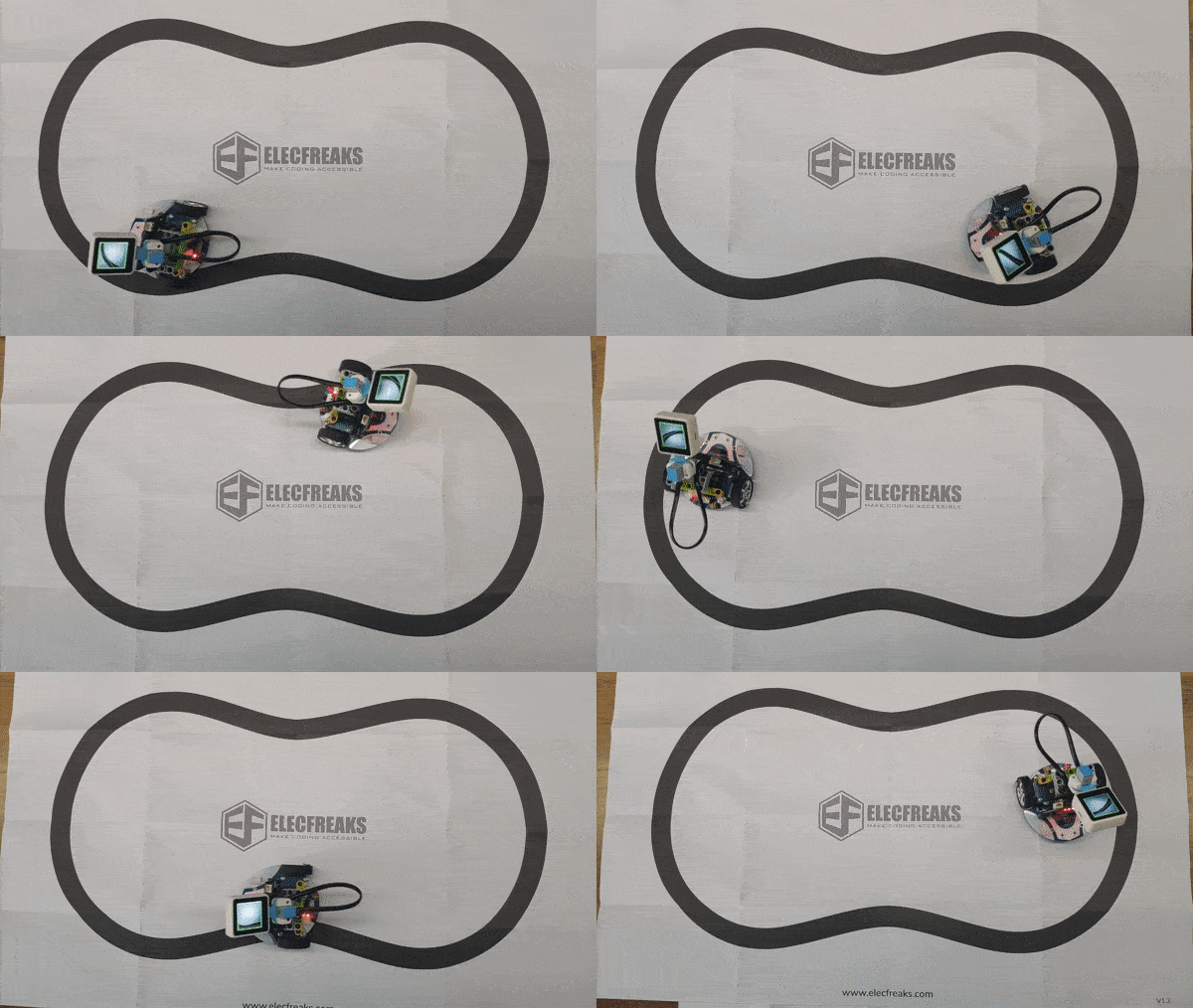
Fuente: [https://www.elecfreaks.com/learn-en/microbitKit/smart\_cutebot/cutebot%2BAI%20lens/cutebot\_case16.html#result](https://www.elecfreaks.com/learn-en/microbitKit/smart_cutebot/cutebot%2BAI%20lens/cutebot_case16.html#result)

# Detección de color

##### <span style="color: rgb(22, 145, 121);">**DETECCIÓN DE COLOR**</span>  


<span style="color: rgb(0, 0, 0);">El programa es sencillo, inicializo la cámara en modo "tracking" y en el bucle del programa si va hacia la derecha, giro a la derecha, si ...</span>

<div id="bkmrk--2" style="position: relative; height: 0; padding-bottom: 70%; overflow: hidden;"><iframe frameborder="0" sandbox="allow-popups allow-forms allow-scripts allow-same-origin" src="https://makecode.microbit.org/#pub:S74177-38185-48464-13563" style="position: absolute; top: 0; left: 0; width: 100%; height: 100%;"></iframe>

</div><span style="color: rgb(0, 0, 0);">Fuente [https://www.elecfreaks.com/learn-en/microbitKit/smart\_cutebot/cutebot%2BAI%20lens/cutebot\_case16.html](https://www.elecfreaks.com/learn-en/microbitKit/smart_cutebot/cutebot%2BAI%20lens/cutebot_case16.html)</span>

<span style="color: rgb(0, 0, 0);">Podemos ver el resultado</span>

<iframe allow="accelerometer; autoplay; clipboard-write; encrypted-media; gyroscope; picture-in-picture; web-share" allowfullscreen="allowfullscreen" frameborder="0" height="602" src="https://www.youtube.com/embed/fzudjme-dpc" title="June 9, 2024" width="338"></iframe>

Variante: Tocar una nota diferente según el color. Ver la idea en [https://www.elecfreaks.com/learn-en/microbitplanetX/ai/Plant\_X\_EF05045\_03.html](https://www.elecfreaks.com/learn-en/microbitplanetX/ai/Plant_X_EF05045_03.html)

# Señales de tráfico

En este programa podemos ver el potencial de esta cámara, es capaz de interpretar las siguientes señales de tráfico que incorpora la cámara en forma de tarjetas

[![2024-11-22 15_28_13-Microsoft MakeCode for micro_bit.png](https://libros.catedu.es/uploads/images/gallery/2024-11/scaled-1680-/2024-11-22-15-28-13-microsoft-makecode-for-micro-bit.png)](https://libros.catedu.es/uploads/images/gallery/2024-11/2024-11-22-15-28-13-microsoft-makecode-for-micro-bit.png)
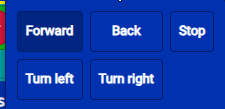
Código

<div id="bkmrk--1" style="position: relative; height: 0; padding-bottom: 70%; overflow: hidden;"><iframe frameborder="0" sandbox="allow-popups allow-forms allow-scripts allow-same-origin" src="https://makecode.microbit.org/#pub:S97151-16215-14296-54794" style="position: absolute; top: 0; left: 0; width: 100%; height: 100%;"></iframe>

</div>Fuente Modificado de [https://www.elecfreaks.com/learn-en/microbitKit/smart\_cutebot/cutebot%2BAI%20lens/cutebot\_case17.html](https://www.elecfreaks.com/learn-en/microbitKit/smart_cutebot/cutebot%2BAI%20lens/cutebot_case17.html)

Resultado

<iframe allow="accelerometer; autoplay; clipboard-write; encrypted-media; gyroscope; picture-in-picture; web-share" allowfullscreen="allowfullscreen" frameborder="0" height="849" src="https://www.youtube.com/embed/9_kF0oLumPY" title="CUTEBOT AI LENS SEÑALES DE TRÁFICO" width="478"></iframe>

<p class="callout success">¿Qué esperas para mejorar el programa y añadir **BACK** </p>

# Aprendo imagen

Podemos usar la AI de la cámara para reconocer objetos pero antes tenemos que "enseñarle" para ello usaremos un botón, para que aprenda el objeto que tiene enfrente, puede aprender hasta 5 objetos diferentes:

[![2024-11-23 07_52_57-Microsoft MakeCode for micro_bit.png](https://libros.catedu.es/uploads/images/gallery/2024-11/scaled-1680-/2024-11-23-07-52-57-microsoft-makecode-for-micro-bit.png)](https://libros.catedu.es/uploads/images/gallery/2024-11/2024-11-23-07-52-57-microsoft-makecode-for-micro-bit.png)
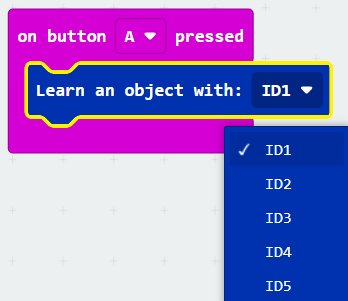
El código [https://makecode.microbit.org/S92780-88372-65474-49727](https://makecode.microbit.org/S92780-88372-65474-49727)

<div id="bkmrk--1" style="position: relative; height: 0; padding-bottom: 70%; overflow: hidden;"><iframe frameborder="0" sandbox="allow-popups allow-forms allow-scripts allow-same-origin" src="https://makecode.microbit.org/#pub:S92780-88372-65474-49727" style="position: absolute; top: 0; left: 0; width: 100%; height: 100%;"></iframe>

</div>##### <span style="color: rgb(22, 145, 121);">**Resultado**</span>

Apretamos a A para que aprenda una carta, y B para que aprenda otra

<iframe allow="accelerometer; autoplay; clipboard-write; encrypted-media; gyroscope; picture-in-picture; web-share" allowfullscreen="allowfullscreen" frameborder="0" height="634" src="https://www.youtube.com/embed/7t00aD6META" title="aprender objeto AI Lens" width="356"></iframe>

Y el resultado es:

<iframe allowfullscreen="allowfullscreen" height="314" src="https://www.youtube.com/embed/mG6BgfK8nFo" width="560"></iframe>

# Detecto cara

Una variedad del anterior programa es este que detecta la cara de una persona

<span style="color: rgb(22, 145, 121);">**Código**</span>:  
[https://makecode.microbit.org/S90567-74631-68997-90362](https://makecode.microbit.org/S90567-74631-68997-90362)

<div id="bkmrk-" style="position: relative; height: 0; padding-bottom: 70%; overflow: hidden;"><iframe frameborder="0" sandbox="allow-popups allow-forms allow-scripts allow-same-origin" src="https://makecode.microbit.org/#pub:S90567-74631-68997-90362" style="position: absolute; top: 0; left: 0; width: 100%; height: 100%;"></iframe>

</div>##### **<span style="color: rgb(22, 145, 121);">Resultado</span>**  


##### <iframe allow="accelerometer; autoplay; clipboard-write; encrypted-media; gyroscope; picture-in-picture; web-share" allowfullscreen="allowfullscreen" frameborder="0" height="634" src="https://www.youtube.com/embed/pe4ele7h4ZE" title="23 de noviembre de 2024" width="356"></iframe>