Ojo, hay que conectar un **buzzer pasivo,** es decir, que reproduce la señan analógica en sonido (o sea un altavoz normal y corriente)
si quieres conectar un **buzzer activo**, reproduce un tono (prederminado) al suministrarle un 1, el siguiente código sonaría una alarma:
``` from microbit import * while True: pin0.write_digital(1) sleep(500) pin0.write_digital(0) sleep(500) ```En los siguientes ejemplo usaremos siempre **buzzer pasivo.** Si no te queda claro lo que es un buzzer activo y un pasivo, mira [esta págin](https://libros.catedu.es/books/programa-arduino-mediante-codigo/page/actuadores-y-otras-salidas-GLB)a
##### **CREA TUS EFECTOS** Puedes crear los efectos utilizando rangos de frecuencias, aquí en el ejemplo la función pitch reproduce durante 6mseg las frecuencias de medio 880 , aguda 1760 y grave 16 y luego lo mismo pero en orden decreciente, y así sucesivamente para dar el efecto de sirena. ``` import music from microbit import * display.show(Image.GHOST) while True: for freq in range(880, 1760, 16): music.pitch(freq, 6) for freq in range(1760, 880, -16): music.pitch(freq, 6) ``` Extraído de [https://microbit-micropython.readthedocs.io/en/v2-docs/tutorials/music.html#sound-effects](https://microbit-micropython.readthedocs.io/en/v2-docs/tutorials/music.html#sound-effects) **** ##### **MUSICA PREDEFINIDA** En Reference- Sound tienes muchos tonos predefinidos para experimentar: [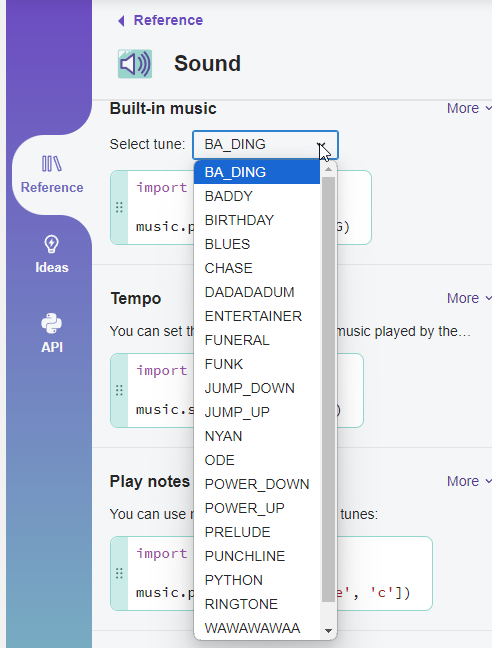](https://libros.catedu.es/uploads/images/gallery/2024-09/2024-09-24-13-13-12-micro-bit-python-editor.png) Si tienes la microbit v2 tienes otros en "E**xpressive sounds**" como audio.play(Sound.TWINKLE) También puede hablar, arrastra el código que tienes en Refernce-Sound- Speech, pero no lo intentes en español, no se entiende nada ``` import speech from microbit import * display.show(Image.FABULOUS) speaker.on() set_volume(255) speech.say('Hello, How are you? Do you sign up in online course in CATEDU.ES ?') audio.play(Sound.TWINKLE) ``` ##### **CONSTRUYENDO TU MÚSICA** Tienes que añadir la librería **music** y componer las notas según la notación americana : [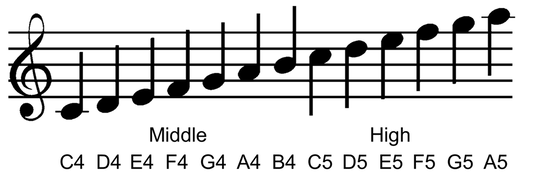](https://libros.catedu.es/uploads/images/gallery/2024-09/2024-09-24-12-45-51-making-music-with-the-micro-bit-micropython-version-teachcomputing.png) *Fuente [https://www.teachwithict.com/microbit-music-python.html](https://www.teachwithict.com/microbit-music-python.html)* *BBC micro:bit "Magic 8-Ball" lesson is licenced under a [Creative Commons Attribution 4.0 International License](http://creativecommons.org/licenses/by-sa/4.0/).* La duración (si no se pone, sigue con la duración anterior) [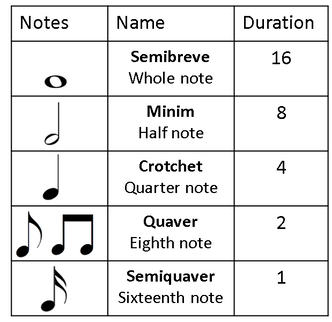](https://libros.catedu.es/uploads/images/gallery/2024-09/2024-09-24-12-46-47-making-music-with-the-micro-bit-micropython-version-teachcomputing.png) *Fuente [https://www.teachwithict.com/microbit-music-python.html](https://www.teachwithict.com/microbit-music-python.html)* *BBC micro:bit "Magic 8-Ball" lesson is licenced under a [Creative Commons Attribution 4.0 International License](http://creativecommons.org/licenses/by-sa/4.0/).* Se puede poner incluso sostenidos, por ejemplo C#4:4 o f#5:4 Si quieres poner descansos es con la letra r seguido de su duración por ejemplo r:4 r:2 ##### **Un ejemplo** Tono Nokia (arriba la duración) [](https://libros.catedu.es/uploads/images/gallery/2024-09/fdKimage.png) El código sería: ``` from microbit import * import music tune = ["e5:2","d5","f#4:4","g#4","c#5:2","b4","d4:4","e4","b4:2","a4","c#4:4","e4","a4:12"] music.play(tune) ``` Otro ejemplo, el código lo tienes en [https://microbit-micropython.readthedocs.io/en/v2-docs/music.html](https://microbit-micropython.readthedocs.io/en/v2-docs/music.html)