# PROYECTO BUZZ WIRE GAME

##### <span style="color: rgb(22, 145, 121);">**Enunciado**</span>

<p class="callout info">Este juego es el típico de pasar una arandela por un cable y si toca, suena la alarma</p>

#####  <span style="color: rgb(22, 145, 121);">**Hardware**</span>

<span style="color: rgb(0, 0, 0);">Preparamos :</span>

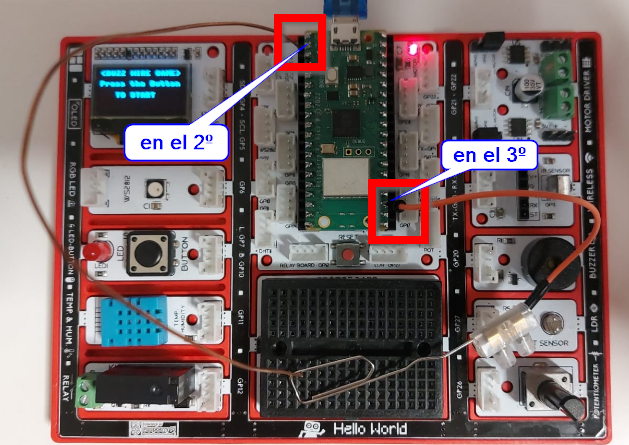
- <span style="color: rgb(0, 0, 0);">un cable pelado, rígido pero fino, conectado en el GP1 (segundo agujero por arriba izquierda) y GND (tercer agujero abajo derecha)</span>
- <span style="color: rgb(0, 0, 0);">un cable normal dupond</span>
- <span style="color: rgb(0, 0, 0);">un clip unido al cable normal dupond por una regleta pequeña como en la foto.</span>

<span style="color: rgb(0, 0, 0);">[![2025-01-09 21_45_02-.png](https://libros.catedu.es/uploads/images/gallery/2025-01/scaled-1680-/2025-01-09-21-45-02.png)](https://libros.catedu.es/uploads/images/gallery/2025-01/2025-01-09-21-45-02.png)</span>

##### <span style="color: rgb(22, 145, 121);">**Software**</span>

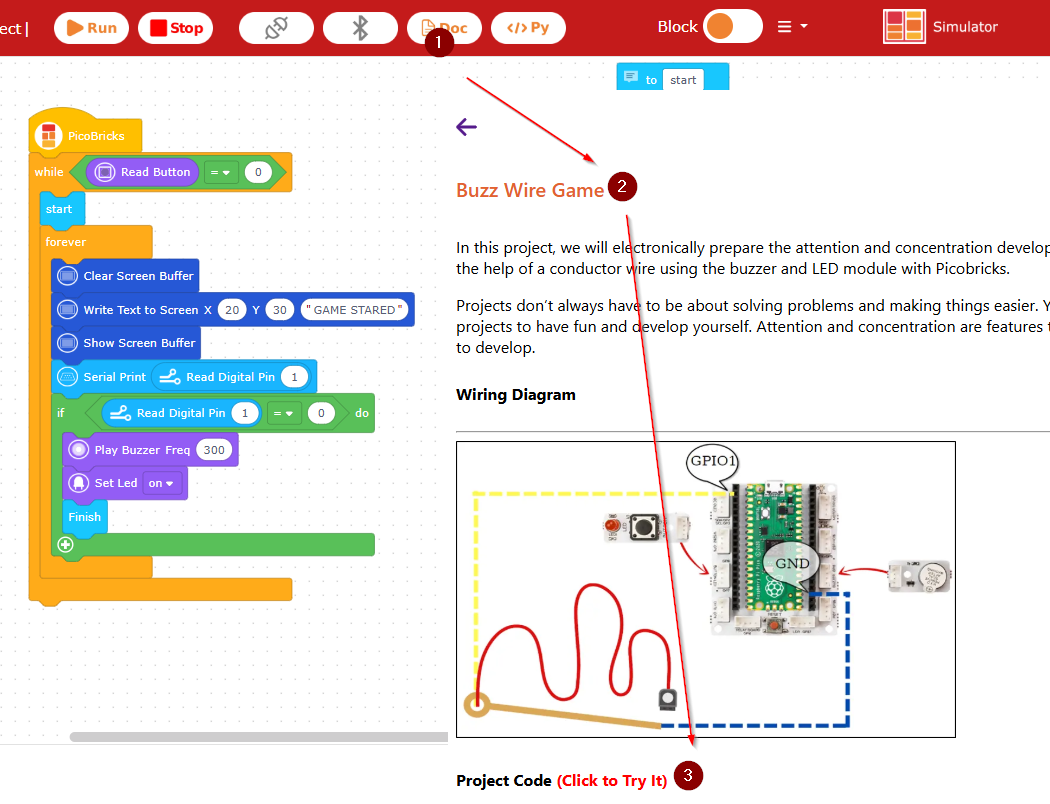
<span style="color: rgb(0, 0, 0);">El programa lo tienes en los tutoriales Buzz Wire Game</span>

<span style="color: rgb(0, 0, 0);">[![2025-01-09 21_54_53-PicoBricks Blocks.png](https://libros.catedu.es/uploads/images/gallery/2025-01/scaled-1680-/2025-01-09-21-54-53-picobricks-blocks.png)](https://libros.catedu.es/uploads/images/gallery/2025-01/2025-01-09-21-54-53-picobricks-blocks.png)</span>

##### <span style="color: rgb(22, 145, 121);">**Resultado**</span>

<iframe allow="accelerometer; autoplay; clipboard-write; encrypted-media; gyroscope; picture-in-picture; web-share" allowfullscreen="allowfullscreen" frameborder="0" height="669" src="https://www.youtube.com/embed/CzDTe3UoNcA" title="PROYECTO BUZZ WIRE GAME PICOBRICKS" width="376"></iframe>

Este proyecto no funciona muy bien con los otros lenguajes de programación, no sé por qué