# RETOS no IoT
# Project 1.1 LED Flashing
SOLUCIÓN CON BLOQUES [https://www.steamakersblocks.com/web/project/2520299](https://www.steamakersblocks.com/web/project/2520299)
SOLUCION CON CODIGO [https://docs.keyestudio.com/projects/KS5009/en/latest/docs/Python/Python.html#project-1-1-led-flashing](https://docs.keyestudio.com/projects/KS5009/en/latest/docs/Python/Python.html#project-1-1-led-flashing)
# Project 1.2 Breathing LED
En este código se va a utilizar la intensidad PWM para dar la sensación de subida y bajada gradual
- Solución con bloques [https://www.steamakersblocks.com/web/project/2520329](https://www.steamakersblocks.com/web/project/2520329)
- Solución con código [https://docs.keyestudio.com/projects/KS5009/en/latest/docs/Python/Python.html#project-1-2-breathing-led](https://docs.keyestudio.com/projects/KS5009/en/latest/docs/Python/Python.html#project-1-2-breathing-led)
##### **¿Qué son las salidas PWM?**
{{@2946}}
# Project 2.1 Read the Button
- SOLUCIÓN POR BLOQUES [https://www.steamakersblocks.com/web/project/2520373](https://www.steamakersblocks.com/web/project/2520373)
- he optado por un retardo de 1 segundo para que se vea bien
- SOLUCIÓN CON CÓDIGO [https://docs.keyestudio.com/projects/KS5009/en/latest/docs/Python/Python.html#project-2-1-read-the-button](https://docs.keyestudio.com/projects/KS5009/en/latest/docs/Python/Python.html#project-2-1-read-the-button)
# Project 2.2. Table Lamp
- SOLUCIÓN CON BLOQUES [https://www.steamakersblocks.com/web/project/2520536](https://www.steamakersblocks.com/web/project/2520536)
- SOLUCIÓN CON CÓDIGO [https://docs.keyestudio.com/projects/KS5009/en/latest/docs/Python/Python.html#project-2-2-table-lamp](https://docs.keyestudio.com/projects/KS5009/en/latest/docs/Python/Python.html#project-2-2-table-lamp)
# Project 3.1 Read the PIR Motion Sensor
- SOLUCIÓN CON BLOQUES [https://www.steamakersblocks.com/web/project/2520553](https://www.steamakersblocks.com/web/project/2520553)
- SOLUCIÓN CON CÓDIGO [https://docs.keyestudio.com/projects/KS5009/en/latest/docs/Python/Python.html#project-3-1-read-the-pir-motion-sensor](https://docs.keyestudio.com/projects/KS5009/en/latest/docs/Python/Python.html#project-3-1-read-the-pir-motion-sensor)
# Project 4.1 Play Happy Birthday
- SOLUCIÓN CON BLOQUES [https://www.steamakersblocks.com/web/project/2521317](https://www.steamakersblocks.com/web/project/2521317)
- SOLUCIÓN CON CÓDIGO [https://docs.keyestudio.com/projects/KS5009/en/latest/docs/Python/Python.html#project-4-1-play-happy-birthday](https://docs.keyestudio.com/projects/KS5009/en/latest/docs/Python/Python.html#project-4-1-play-happy-birthday)
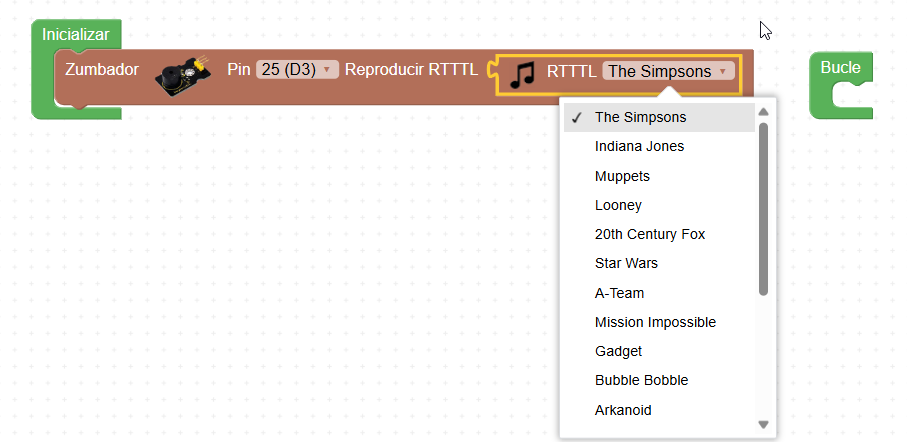
Bueno, en la solución con bloques no es happy birthday pero podemos elegir la melodía que queramos
[](https://libros.catedu.es/uploads/images/gallery/2025-10/2025-10-22-19-22-02-mattermost-desktop-app.png)
Si queremos crear un sonido RTTTL mirar [https://fgcoca.github.io/ESP32-STEAMakers/A05/](https://fgcoca.github.io/ESP32-STEAMakers/A05/)
# Project 5.1 Control the Door
- SOLUCIÓN POR BLOQUES [https://www.steamakersblocks.com/web/project/2520583](https://www.steamakersblocks.com/web/project/2520583)
- SOLUCIÓN POR CÓDIGO [https://docs.keyestudio.com/projects/KS5009/en/latest/docs/Python/Python.html#project-5-1-control-the-door](https://docs.keyestudio.com/projects/KS5009/en/latest/docs/Python/Python.html#project-5-1-control-the-door)
# Project 5.2 Close the Window
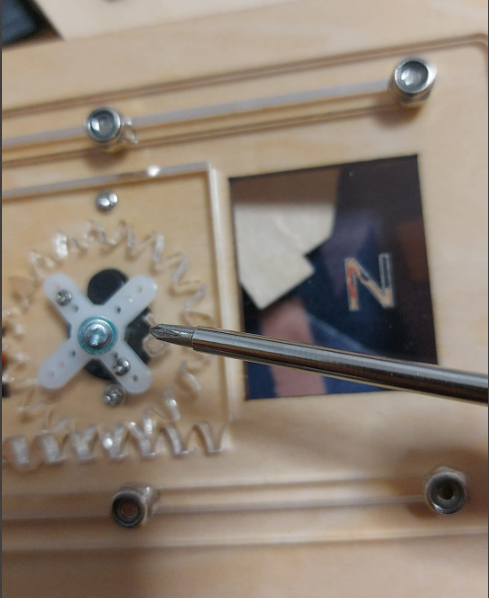
Si llueve, que cierre la ventana. Se ha decidido poner como límite de humedad 50, con sólo humedecer un poco el dedo, supera ese umbral, y si esta poco mojado, se seca enseguida y baja de 50 con lo que se vuelve a abrir la ventana.
Los ángulos correctos para el servo son
- 120º la ventana esta abierta
- 0º la ventana esta cerrada
- SOLUCIÓN POR BLOQUES [https://www.steamakersblocks.com/web/project/2521324](https://www.steamakersblocks.com/web/project/2521324)
- SOLUCIÓN CON CÓDIGO [https://docs.keyestudio.com/projects/KS5009/en/latest/docs/Python/Python.html#project-5-2-close-the-window](https://docs.keyestudio.com/projects/KS5009/en/latest/docs/Python/Python.html#project-5-2-close-the-window)
**AJUSTAMOS LA VENTANA PARA QUE SE CIERRE Y ABRA CORRECTAMENTE CON ESTOS ÁNGULOS Y YA PODEMOS PONER EL TORNILLO CENTRAL**
[](https://libros.catedu.es/uploads/images/gallery/2025-10/2025-10-22-21-09-24-whatsapp.png)
# Project 6.1 RGB Sk6812
- SOLUCIÓN CON BLOQUES [https://www.steamakersblocks.com/web/project/2521483](https://www.steamakersblocks.com/web/project/2521483)
- SOLUCIÓN CON CÓDIGO [https://docs.keyestudio.com/projects/KS5009/en/latest/docs/Python/Python.html#project-6-1-rgb-sk6812](https://docs.keyestudio.com/projects/KS5009/en/latest/docs/Python/Python.html#project-6-1-rgb-sk6812)
Hemos puesto dos vídeos, uno con el programa de bloques y otro con el de código ¿Quién es quien?
# Project 7.2 Button Control Fan
- SOLUCIÓN POR BLOQUES [https://www.steamakersblocks.com/web/project/2521510](https://www.steamakersblocks.com/web/project/2521510)
- SOLUCIÓN CON CÓDIGO [https://docs.keyestudio.com/projects/KS5009/en/latest/docs/Python/Python.html#project-7-2-button-control-fan](https://docs.keyestudio.com/projects/KS5009/en/latest/docs/Python/Python.html#project-7-2-button-control-fan)
# Project 8.2 Dangerous Gas Alarm
El detector de gas MQ2 es sensible al gas butano, si tenemos vitro, probarlo con un encendedor de gas pero sin hacer la chispa.
Hemos elegido que si detecta gas sale una advertencia por el display, suena un tono y hace funcionar el ventilador
También detecta el **alcohol**, como se puede ver en el curso de SMART HOME PARA MICROBIT [https://libros.catedu.es/books/smart-home-para-microbit/page/gas](https://libros.catedu.es/books/smart-home-para-microbit/page/gas)
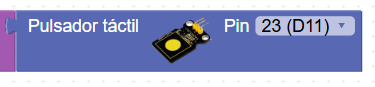
ATENCION: EN STEAMAKERSBLOCK no se encuentra este sensor de gas, pero como es un sensor de todo o nada pull down, es decir digital, que emite un 1 si no detecta y emite un 0 si detecta, se cambia por un sensor tactil, (o de lluvia o de cualquier cosa que haga 1 o 0)
[](https://libros.catedu.es/uploads/images/gallery/2025-10/2025-10-23-13-29-13-whatsapp.png)
- SOLUCIÓN CON BLOQUES HOME [https://www.steamakersblocks.com/web/project/2523009](https://www.steamakersblocks.com/web/project/2523009)
- SOLUCIÓN CON CÓDIGO https://docs.keyestudio.com/projects/KS5009/en/latest/docs/Python/Python.html#project-8-2-dangerous-gas-alarm
# Project 9.1 Temperature and Humidity Tester
[](https://libros.catedu.es/uploads/images/gallery/2025-10/2025-10-23-13-25-25-whatsapp.png)
- SOLUCION POR BLOQUES [https://www.steamakersblocks.com/web/project/2523126](https://www.steamakersblocks.com/web/project/2523126)
- SOLUCION CON CÓDIGO [https://docs.keyestudio.com/projects/KS5009/en/latest/docs/Python/Python.html#project-9-1-temperature-and-humidity-tester](https://docs.keyestudio.com/projects/KS5009/en/latest/docs/Python/Python.html#project-9-1-temperature-and-humidity-tester)
# Project 10.1 Open the Door
- SOLUCIÓN CON BLOQUES [https://www.steamakersblocks.com/web/project/2523179](https://www.steamakersblocks.com/web/project/2523179)
- SOLUCIÓN CON CÓDIGO [https://docs.keyestudio.com/projects/KS5009/en/latest/docs/Python/Python.html#project-10-1-open-the-door](https://docs.keyestudio.com/projects/KS5009/en/latest/docs/Python/Python.html#project-10-1-open-the-door)